When Does a Second DGX Spark Actually Help?
A second DGX Spark can solve a capacity problem, reduce request queues or separate competing workloads. Learn when another system is worth buying.
By Uniqcli Team · · 11 min read

Key takeaways
- Keep one DGX Spark if it meets your model capacity, response-time and concurrent workload requirements.
- Two independent replicas can reduce request queues or separate workloads, but they do not automatically speed up individual responses.
- A distributed two-system setup may support larger models, but memory, latency, output quality and cost must be tested.
On this page
A second DGX Spark can be useful when a model cannot fit within one system's available memory, requests start queuing during busy periods, or background jobs interfere with interactive work. But buying another machine does not automatically make every response faster. There are two important ways to use a pair of systems. You can run a separate model service on each machine to handle independent requests, or distribute one model across both machines using compatible software. These configurations solve different problems and should not be evaluated as though they deliver the same benefit.
Before buying another DGX Spark, identify what your current setup cannot do. Does the model fail to load? Does the fourth simultaneous coding session wait too long? Does a background indexing job make interactive answers slower? Each problem points toward a different solution. This guide focuses on 128 GB DGX Spark configurations. It provides a practical way to evaluate one system against two-system deployments. The tests are recommendations for buyers, not performance measurements conducted by Uniqcli.
Identify where the delay occurs
Start by following a typical request from submission to its completed answer. Separate the time spent waiting in a queue, processing the prompt and generating the response.
A system may produce tokens quickly once generation starts but still feel slow because the user waits for a long prompt to be processed. Another setup may respond quickly to one person but become less responsive when several users submit requests together.
Measure these situations separately. Record whether delays occur during a single request, a long conversation, or periods of simultaneous use.
If a model fails to load or runs out of memory, record the model version, quantization format, context length, number of simultaneous requests and relevant error logs.
Each DGX Spark has its own unified memory. Connecting two systems does not automatically create one transparent memory pool that any application can use. A model distributed across both machines requires compatible serving software, a supported configuration and communication between the devices.
This distinction matters when deciding whether the problem is insufficient model capacity or insufficient serving capacity.
Compare three deployment profiles
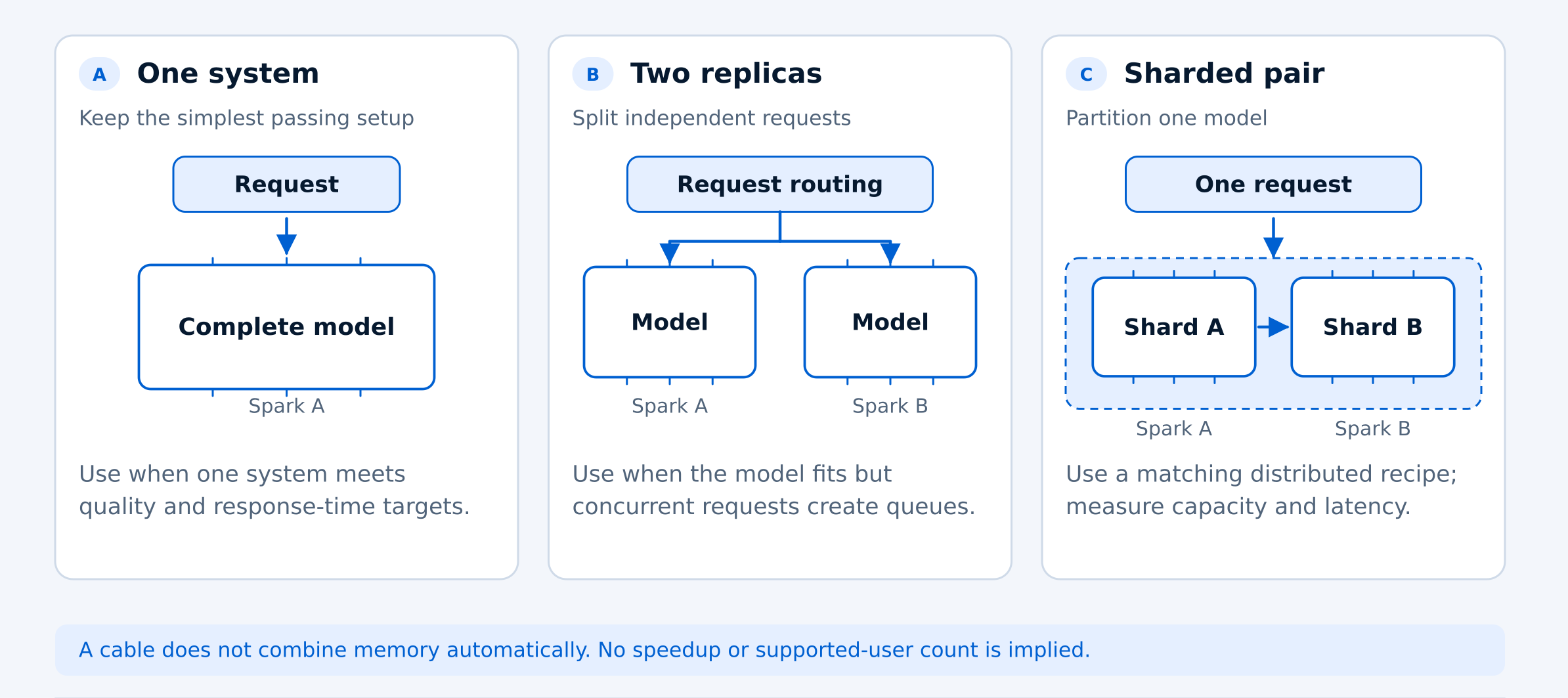
The best DGX Spark configuration depends on what you need to improve. If one system already handles your workload, additional hardware may not be necessary. If requests queue during busy periods, two independent replicas may help. If a model cannot fit on one system, distributing it across two compatible machines may be worth testing. These three deployment profiles solve different problems. Compare them using the same workload, response-time targets and answer-quality requirements before deciding whether a second DGX Spark is worth the investment.
Profile A: One DGX Spark
Keep one DGX Spark when it can run your required model, produce acceptable answers and meet response-time targets during normal and busy periods.
Before changing the hardware, establish a baseline you can reproduce. Record the model version, quantization format, serving runtime, container version, launch settings and context-length limits. These details matter because software differences can affect performance as much as the hardware configuration.
Test more than a single-user demonstration. A model that responds quickly to one request may behave differently when several users submit long prompts simultaneously. Measure both individual response times and overall throughput under realistic demand.
NVIDIA provides separate serving instructions for single-system and clustered deployments. Choose a recipe appropriate for your hardware and memory configuration, and record whether features such as speculative decoding are enabled.
If one DGX Spark consistently meets your requirements with enough capacity for busier periods, there may be no reason to purchase a second system.
Profile B: Two independent model replicas
In this configuration, each DGX Spark runs its own complete model service. Incoming requests can be distributed between the two systems, allowing them to handle separate workloads rather than splitting a single model.
This approach is worth considering when your model already fits on one DGX Spark and produces acceptable answers, but requests begin queuing during busy periods. Running two replicas may improve overall serving capacity, although it does not automatically make an individual response faster.
Each replica needs enough memory for its own model and active requests. The systems do not combine their memory simply because they are connected.
Before relying on two replicas, check how requests are distributed and what happens if one service becomes unavailable. Load balancing, health checks and failover need to be configured and tested. Running two model services alone does not guarantee high availability.
Conversation history also matters. If the client sends the full conversation with every request, switching between replicas may be straightforward. If the service stores session information locally, requests must reach the correct session or use shared state to maintain continuity.
Another option is to give each machine a different job. For example, one DGX Spark could handle interactive AI requests while the other processes document indexing or batch inference. This arrangement may be more useful when background work is causing delays for users.
Profile C: One model distributed across two systems
A distributed configuration is worth considering when the model you want to run cannot fit within one DGX Spark's usable memory, or when a supported two-system setup offers a measurable benefit for your workload.
Unlike independent replicas, this approach distributes one model across both machines. NVIDIA provides a two-DGX Spark walkthrough using vLLM, but the setup requires compatible software, a properly configured connection between the systems and a supported model configuration.
NVIDIA’s current two-system vLLM walkthrough uses two DGX Spark systems with matching memory capacity and a configured ConnectX connection. Follow the instructions for your specific hardware and software versions.
Using two systems does not automatically double inference speed. Distributed inference introduces communication and coordination between machines, which can affect latency and throughput. Performance depends on the model architecture, parallelism strategy, network connection, context length and number of simultaneous requests.
Start with NVIDIA's documented two-system recipe rather than assuming that any model can be distributed successfully. Record the exact model version, quantization format, container image, software versions and launch settings so the results can be reproduced.
Test the configuration with realistic prompts, context lengths and concurrent requests. Measure time to first token, generation speed, completed requests, errors and answer quality. A model that loads successfully across two systems still needs to demonstrate that it can complete your intended work reliably.
Also consider the additional setup and operational requirements. A distributed model depends on both systems and their communication link. If one machine or the connection fails, the distributed service may become unavailable.
When this setup makes sense: You need to run a model that exceeds one system's practical capacity, or testing demonstrates that a supported distributed configuration meets your performance requirements better than a single DGX Spark.
Which configuration should you choose?
The right DGX Spark configuration depends on the problem you are trying to solve, not simply the number of systems available. If one system already meets your model capacity, response-time and quality requirements, additional hardware may offer little practical benefit. If requests queue during busy periods, two independent replicas are worth testing. If the required model exceeds one system's usable memory, a supported distributed configuration may be more appropriate. Use the results from your current workload to decide which configuration deserves further testing. The goal is to solve a measurable problem rather than add hardware without a clear benefit.
Build a comparison that answers your question
Before comparing one DGX Spark with two, build a test set that reflects how your team actually uses AI. Choose public examples or tasks with sensitive information removed. Include short questions, long document prompts and clearly defined coding tasks where relevant.
Decide how you'll evaluate the answers before running the tests. Include difficult questions, tasks requiring factual accuracy and cases where the model should acknowledge that it doesn't have enough information. A faster response isn't useful if the answer fails your quality requirements.
Test each configuration with one, two, four and eight simultaneous requests where feasible. These are suggested testing levels, not claims about how many users DGX Spark officially supports. Record input and output tokens, completed tasks, errors, retries and incomplete responses.
Measure startup time separately from normal operation. If the service restarts regularly, include the time required to load the model and become ready. For continuously running services, measure performance under sustained demand. Also note whether prompt caching is enabled, since repeated prompts may process faster than new ones.
Use the same test set and acceptance criteria for all three configurations: one system, two independent replicas and one distributed model. Record the median and 95th-percentile time to first token, generation speed per request, combined throughput and answer quality. This helps distinguish improvements in individual response time from improvements in overall serving capacity.
For models that fit every configuration, keep the model, quantization, prompts and output limits the same wherever supported. If the distributed pair is being tested with a model that cannot fit on one system, report that as a capacity comparison rather than a like-for-like speed comparison.
What to measure when comparing DGX Spark configurations
Use the same test workload and measurement method for each configuration. Record actual results rather than estimated performance.
Benchmark Measurements
- Model, software and configuration
- Record the model, quantization, serving runtime and launch settings for each setup.
- Time to first token (TTFT)
- Measure median and 95th-percentile latency for each configuration.
- Total completion time
- Measure the time from submitting a request to receiving the final output, including any time spent waiting in a queue.
- Generation speed per request
- Measure output tokens per second for an individual request.
- Combined output across requests
- Measure total output tokens per second across concurrent requests.
- Answer quality, errors and retries
- Score accepted answers and record errors, retries and incomplete requests.
- Electricity used per accepted task
- Measure total test energy, including failed attempts, and divide it by the number of tasks that pass quality review.
Repeat each test after warm-up and record how much results vary. Record the number of requests and test duration. Confirm that requests finish successfully at the configured limits; accepting a long prompt is not enough if the service runs out of memory before completing the answer.
Keep software improvements visible
- Record software versions: Note the model, quantization format, serving runtime, container version and launch settings for each configuration.
- Check speculative decoding: Record whether it is enabled on either setup. Different settings can affect performance independently of the hardware.
- Keep test conditions consistent: Use the same model, prompts, sampling parameters and decoding settings wherever supported.
- Document configuration differences: If identical settings are not supported, record the differences instead of forcing an incompatible setup.
- Measure tokens accurately: Use the model tokenizer or server-reported usage rather than counting streamed messages.
- Test network performance separately: Network bandwidth alone does not establish model inference speed. Measure application latency and throughput independently.
Make the buying decision from accepted work
A second DGX Spark is worth considering when it solves a measurable problem at an acceptable cost. The goal is not simply to add more hardware, but to improve the amount of useful work your team can complete. Keep one DGX Spark if it meets your model capacity, answer-quality and response-time requirements, including during busier periods. Add a second system as an independent replica when testing shows that it reduces request queues or allows competing workloads to run without interfering with one another.
A distributed pair may make sense when your target model cannot fit on one system or when testing shows a clear performance benefit. If neither setup meets your requirements, compare other GPU platforms rather than assuming more DGX Spark systems are the answer. Look at the full cost of each option, including hardware, networking, electricity, maintenance and support. A useful comparison is cost per accepted task: the total relevant cost divided by the number of completed tasks that meet your quality standards.
Before requesting a quote, have your target model, required context length, expected number of simultaneous users and response-time goals ready. If you're already using a DGX Spark, include any performance results you've collected. These details can help Uniqcli recommend a suitable hardware configuration. In some cases, the best decision may be to add another DGX Spark. In others, it may be to choose a different platform or keep the system you already have.
Include hardware, networking, storage, electricity, setup, support, administration, failed attempts and review time, using the same period and workload for each option.
Frequently asked questions
Will a second DGX Spark make my AI model run twice as fast?
Not necessarily. If you run a separate model on each system, you may be able to handle more requests at once, but individual answers won't automatically arrive twice as fast. Running one model across two systems is different and introduces communication between machines. The only reliable way to judge the improvement is to test your model and workload.
Can I combine the memory of two DGX Spark systems?
Not automatically. Each DGX Spark has its own memory. With compatible distributed inference software, you can split a supported model across two systems, allowing them to work together on a model that may not fit on one machine. That isn't the same as creating one shared memory pool for every application.
Should I use two model replicas or split one model across both systems?
If your model already fits on one DGX Spark but requests are piling up, start by testing two independent replicas. Each machine can handle separate requests. If your model is too large for one system, a distributed setup may be more appropriate. The best choice depends on whether you need more serving capacity or more room for the model.
How many people can use two DGX Spark systems at the same time?
There's no single user count that applies to every setup. Capacity depends on the model, prompt length, response length, serving software and how quickly users need answers. Test realistic levels of simultaneous use and measure response times, completed requests and errors before setting a user limit.
Do I need special networking to connect two DGX Spark systems?
It depends on how you plan to use them. Independent replicas can serve separate requests over a suitable network, while a distributed model needs a supported connection and configuration for communication between systems. Check NVIDIA's instructions for your exact hardware and software setup before buying cables or networking equipment.
When is buying a second DGX Spark worth the cost?
A second system is worth considering when testing shows it solves a real problem, such as long request queues, competing workloads or a model that cannot run on one machine. Compare the full cost, including hardware, networking, electricity and maintenance. If one DGX Spark already meets your needs, keeping it may be the better decision.
Not sure if you need a second DGX Spark?
Tell us which AI model you're running, how many users you expect and where your current setup falls short. Uniqcli can help you compare hardware options and request a quote that fits your workload.
DGX Spark systems to compare
NVIDIA
NVIDIA DGX Spark 128GB 4TB GB10 Grace Blackwell AI Desktop
$7,724.98In stockPNY Technologies
PNY DGX Spark Desktop AI Computer
$7,849.98In stock