



Ryzen AI Halo 192 GB vs 128 GB: 495 or 395?
Compare Halo 192 GB and 128 GB: processor differences, model fit, context memory and software support.
By Uniqcli Team · · 11 min read · Updated
Key takeaways
- The 192 GB PRO 495 Halo adds 50% more unified memory than the 128 GB 395. Rated bandwidth rises about 6.6%; neither percentage predicts application speed.
- System capacity and GPU allocation differ. AMD describes up to 160 GB for the 192 GB GPU; the 128 GB system's 96 GB Windows VGM figure is not a universal Linux limit.
- Count weights, context cache, runtime buffers and other applications. Model parameter count alone cannot establish whether a workload fits.
- AMD documents GPT-OSS-120B MXFP4 at 63.39 GB in its LM Studio recipe. That checkpoint size excludes the complete running workload.
- Match the OS, model revision, runtime, quantization, context and concurrency before comparing configurations or upgrading.
On this page
Choose the 192 GB Ryzen AI Halo when your model, context and simultaneous workloads need more usable memory than the 128 GB platform provides. Choose 128 GB when that complete workload fits with headroom and meets your response-time target. The larger Halo adds 50% more memory, but its published bandwidth and compute increases are much smaller.
The first-party 192 GB Halo uses Ryzen AI Max+ PRO 495; the 128 GB Halo uses Ryzen AI Max+ 395. This comparison covers those complete systems, designated RAH-002 and RAH-001 by AMD; other Ryzen AI Max desktops can differ.
Ryzen AI Halo 128 GB vs 192 GB specifications
Scroll to see every column.
| Criterion | 128 GB Halo | 192 GB Halo | Why it matters |
|---|---|---|---|
| Platform / processor | RAH-001 / Ryzen AI Max+ 395 | RAH-002 / Ryzen AI Max+ PRO 495 | Different processors and platform configurations |
| Unified memory | 128 GB | 192 GB | 64 GB more capacity; a 50% increase |
| Memory speed | LPDDR5x-8000 | LPDDR5x-8533 | Memory transfer rate, separate from capacity |
| Rated memory bandwidth | 256 GB/s | 273 GB/s | 17 GB/s more; approximately 6.6% |
| CPU cores / threads | 16 Zen 5 / 32 | 16 Zen 5 / 32 | No increase in core or thread count |
| CPU base / maximum boost | 3.0 / 5.1 GHz | 3.1 / 5.2 GHz | Clock specifications do not establish sustained workload performance |
| Integrated GPU | Radeon 8060S; 40 RDNA 3.5 compute units | Radeon 8065S; 40 RDNA 3.5 compute units | Same compute-unit count |
| Rated FP16 AI compute | Up to 60 TFLOPS | Up to 61 TFLOPS | Approximately 1.7% higher peak rating; not measured tokens per second |
| XDNA 2 NPU | 50 TOPS | 55 TOPS | A separate accelerator; do not substitute NPU TOPS for GPU inference results |
| Default processor TDP | 120 W | 120 W | Not a measurement of total wall-power consumption |
| Included storage | 2 TB M.2 SSD, self-encrypting drive | 2 TB M.2 SSD, self-encrypting drive | Same listed storage capacity |
| Network / wireless | One 10 GbE; Wi-Fi 7; Bluetooth 5.4 | One 10 GbE; Wi-Fi 7; Bluetooth 5.4 | No listed networking-capacity upgrade |
| Connectors | Three USB-C; separate USB-C power input; HDMI 2.1b | Three USB-C; separate USB-C power input; HDMI 2.1b | Power input is separate from the three USB data connectors |
| Dimensions / OS choices | 150 × 150 × 45.4 mm; Linux or Windows 11 | 150 × 150 × 45.4 mm; Linux or Windows 11 | Confirm the ordered software configuration |
AMD first-party Halo specifications reviewed November 17, 2026. Percentage changes are calculated as (192 GB platform rating ÷ 128 GB platform rating − 1) × 100. Peak ratings are not application benchmarks.
Table sources
- 1.AMD: Halo with Ryzen AI Max+ 395amd.com
- 2.AMD: Halo with Ryzen AI Max+ PRO 495amd.com
- 3.AMD Halo model specificationsamd.com— CPU clocks, NPU and peak FP16 ratings.
- 4.AMD Halo user guidedeveloper.amd.com— RAH model identifiers and complete-system specifications.
Capacity, bandwidth and compute solve different problems
Capacity determines how much remains in memory; bandwidth describes memory transfers; compute ratings describe arithmetic capability at a stated precision. A model that fits can still be limited by its runtime, kernels or prompt length.
Extra capacity can prevent allocation failures, permit longer context or keep another model resident. It does not establish a 50% generation-speed gain. If 128 GB already holds your workload, measure the bottleneck before upgrading.
GPU allocation depends on Windows or Linux
Unified memory is shared system memory, not an additional pool beside CPU RAM. AMD's October 2026 announcement describes up to 160 GB allocated to the 192 GB Halo's GPU. Its Max+ 395 Variable Graphics Memory guidance describes up to 96 GB on a 128 GB Windows system. Neither figure means all installed RAM is free for model weights.
How Halo memory allocation differs by operating system
Scroll to see every column.
| Configuration | AMD-documented control | What to verify |
|---|---|---|
| 128 GB Halo on Windows | Variable Graphics Memory in AMD Software: Adrenalin Edition; 395 guidance describes up to 96 GB | The allocation reported by the chosen backend, plus system-memory headroom |
| 192 GB Halo on Windows | Adrenalin Performance / Tuning; AMD flags extra instructions when VGM exceeds 128 GB | Follow the current 192 GB instructions before assuming the advertised maximum is available |
| Either Halo on Linux | Developer Center → Settings → Graphics Performance Settings; adjust the shared memory pool | Inspect the effective allocation; do not apply the Windows 96 GB figure as a universal Linux ceiling |
AMD documents preconfigured allocations, but available application memory depends on the selected OS image, allocation and running software. These are configuration instructions, not measured workload limits.
Table sources
- 1.AMD Halo user guide: Variable Graphics Memorydeveloper.amd.com
- 2.AMD: 395 Variable Graphics Memory guidanceamd.com
- 3.AMD: 192 GB Halo announcementamd.com
Budget for your editor, browser, retrieval index, containers and operating system. Moving data between CPU and GPU use does not increase total physical memory.
Start with model weights, then add the running workload
Ideal weight storage in bytes equals parameter count × bits per weight ÷ 8. All calculations use decimal GB: one billion bytes. GiB is a different unit; convert before comparing readings.
Ideal model-weight storage at 4, 8 and 16 bits
Scroll to see every column.
| Total parameters | 4-bit weights | 8-bit weights | 16-bit weights |
|---|---|---|---|
| 30 billion | 15 GB | 30 GB | 60 GB |
| 70 billion | 35 GB | 70 GB | 140 GB |
| 120 billion | 60 GB | 120 GB | 240 GB |
| 200 billion | 100 GB | 200 GB | 400 GB |
| 300 billion | 150 GB | 300 GB | 600 GB |
Our arithmetic, not measured checkpoint sizes or fit guarantees. Assumes every parameter uses the stated number of bits. Excludes quantization metadata, higher-precision tensors, KV cache, runtime buffers and the operating system.
Real formats often store scales and metadata, and some tensors remain at higher precision. A mixture-of-experts model may activate only some parameters for each token while still requiring storage for its resident experts. Use the actual checkpoint and runtime, rather than the active-parameter count, to estimate resident weight memory.
AMD's LM Studio playbook supplies a useful concrete example: its GPT-OSS-120B MXFP4 download is listed at 63.39 GB, and the playbook recommends 128 GB system memory. That documents a specific model recipe; it is not a promise of any context length, concurrency or generation speed. Add the recipe's running-memory requirements before deciding that the remaining capacity is sufficient.
The documented GPT-OSS-120B example
AMD also advertises 300-billion-parameter and larger models at four-bit quantization on 192 GB Halo. The ideal 300B weight calculation is already 150 GB. Treat that announcement as a capability claim requiring model-specific validation, especially when the GPU allocation, context cache and runtime must share a finite budget.
A worked example: context can change the buying decision
For an illustrative 70B-class full-attention transformer, assume 80 layers, eight KV heads, 128 elements per head and 16-bit cached values, or two bytes each. Assume separate key and value tensors, no cache compression and no sharing between concurrent sequences. These are calculation assumptions, not measurements of a named model.
KV-cache bytes = 2 × 80 × 8 × 128 × 2 × cached tokens × concurrent sequences. That is 327,680 bytes per token per sequence. Add the ideal 35 GB of 70B four-bit weights once, assuming the serving runtime shares those weights across requests.
How context and concurrency increase the illustrative memory budget
Scroll to see every column.
| Cached tokens × concurrent sequences | KV cache | Cache + ideal 35 GB weights |
|---|---|---|
| 8,192 × 1 | 2.68 GB | 37.68 GB |
| 32,768 × 1 | 10.74 GB | 45.74 GB |
| 131,072 × 1 | 42.95 GB | 77.95 GB |
| 32,768 × 4 | 42.95 GB | 77.95 GB |
| 131,072 × 2 | 85.90 GB | 120.90 GB |
Our calculation using the explicit full-attention assumptions above, rounded to two decimal places in decimal GB. Tokens include cached prompt and generated tokens. Excludes all other memory overhead; not a Halo benchmark or a model-fit guarantee.
Table sources
- 1.Hugging Face: how caching workshuggingface.co— Per-layer key/value tensor shapes underpin the calculation.
- 2.Hugging Face: cache strategieshuggingface.co— Cache implementation changes actual memory use.
The final case consumes 120.90 decimal GB, or about 112.60 GiB, before quantization metadata, working buffers or other applications. That approaches the 128 GB capacity class and exceeds the cited 96 GB Windows VGM allocation under either common unit convention. Normalize your runtime readings to the same units before calculating remaining memory. This is a reason to investigate 192 GB or change the workload, not proof that either configuration will run it successfully.
Actual cache use varies. Sliding-window and hybrid architectures need different calculations; static caches may reserve a maximum, while quantized caches trade precision and processing overhead for memory. Use the model's architecture and the serving engine's allocation behavior. Test the longest realistic prompt plus generated answer, rather than only the configured context maximum or a short demonstration.
Which Halo capacity should you buy or keep?
Scroll to see every column.
| Your requirement | Starting choice | Evidence to collect |
|---|---|---|
| One model, moderate context, substantial measured headroom | 128 GB | Peak memory and response times with normal supporting applications open |
| Longer context or more simultaneous sessions causes allocation failures | Evaluate 192 GB | Full context/concurrency test; confirm effective GPU allocation |
| A larger checkpoint or less aggressive quantization is required | Evaluate 192 GB | Actual checkpoint size, output-quality benefit and complete runtime budget |
| Several models must stay resident | Evaluate 192 GB | Combined resident weights, independent caches and supporting services |
| Current 128 GB system fits everything but generates slowly | Measure before replacing | Separate prompt processing, generation and CPU-side workflow time |
| Full fine-tuning is the goal | Size the training recipe separately | Gradients, optimizer states, activations, batch size and training framework support |
Editorial decision guidance based on workload requirements. These are starting points for validation, not claims of tested model compatibility.
Choose the software path before the hardware capacity
Both Halo specification sheets list Linux and Windows 11. That does not mean every framework has identical support on both systems. AMD's LM Studio playbook supports Halo on Linux and Windows. Its vLLM playbook metadata lists Halo Linux support and marks Windows unsupported for that recipe. Decide whether you need a desktop model application or a particular serving engine before choosing the OS.
AMD's versioned ROCm 10.1.0 compatibility matrix identifies supported Ryzen APU operating-system and driver combinations. Check that matrix alongside the individual playbook. Record the actual runtime, backend, driver and container version: a recipe described as using the latest application is not a permanently pinned, reproducible software environment.
Check the software support for your chosen OS
AMD LM Studio recipe support
Official metadata lists Halo Linux and Windows support.
AMD vLLM recipe support
Official metadata lists Halo Linux support and marks Windows unsupported for this recipe.
ROCm 10.1.0 compatibility matrix
Check the version-specific Ryzen APU, operating-system and driver combinations.
What to test before buying or replacing a Halo
Use your real prompts and documents. Keep model revision, quantization and output-quality criteria fixed across systems, then vary one requirement at a time.
- Record OS, BIOS, driver, runtime, backend and effective GPU-memory allocation.
- Measure peak memory while the intended editor, retrieval pipeline and other services remain open.
- Run the longest normal context at expected concurrency; include room for generated tokens.
- Measure cold loading, prompt processing, time to first token and sustained generation separately.
- Repeat a representative end-to-end job and check response-time consistency, allocation errors and output quality.
The published 2 TB M.2 SSD specification does not establish a spare slot or an approved customer upgrade procedure. Before planning a storage or RAM upgrade, request the applicable service guidance. Do not purchase 128 GB on the assumption that it can later become the 192 GB configuration.
Compare the exact operating-system configurations for sale
The cards below show a 192 GB PRO 495 Linux configuration and a 128 GB 395 Windows configuration. Their live prices are not a controlled same-OS comparison. Confirm the required operating system, included software and final configuration when requesting a quote.
Ryzen AI Halo configurations
Advanced Micro Devices
AMD Ryzen AI Halo Max+ PRO 495 Developer Platform
$8,424.99In stockAdvanced Micro Devices
AMD Ryzen AI Halo Max+ 395 Developer Platform
$4,849.99In stock
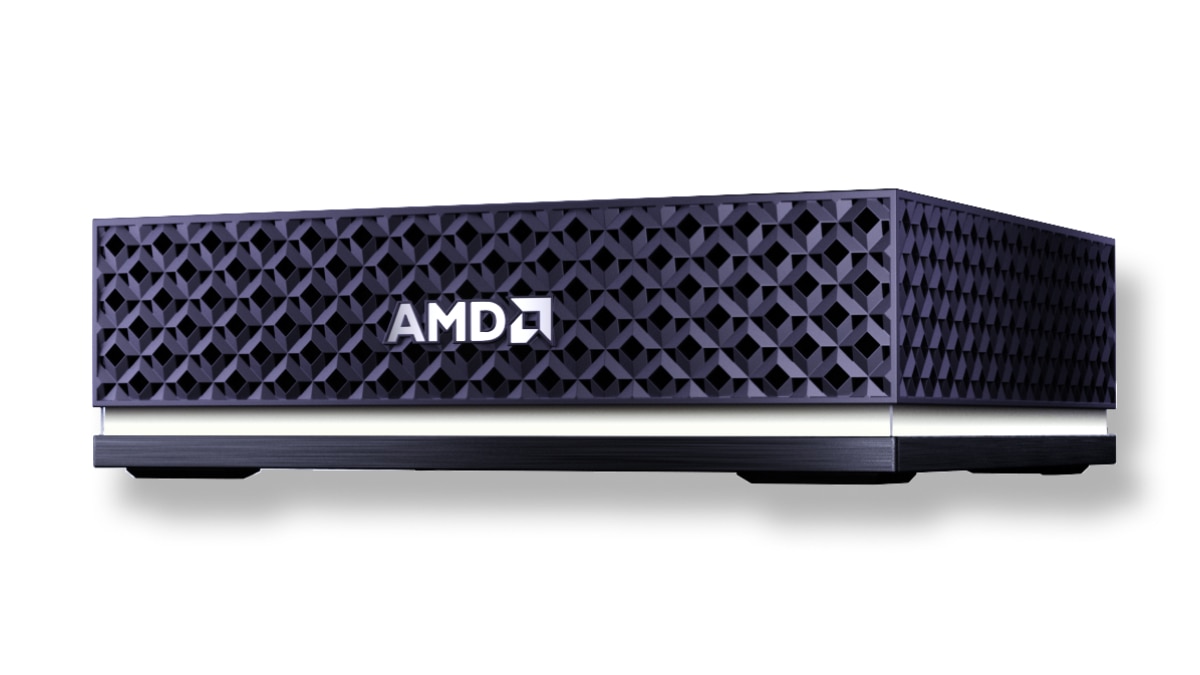
192 GB PRO 495 with Linux and 128 GB 395 with Windows. Compare the required OS and configuration as well as memory capacity.
Specify the Halo configuration for your workload
Include your model revision, quantization, maximum context, concurrency and preferred operating system in your quote request.
FAQ
Is the 192 GB Halo just the 128 GB model with more RAM?
No. AMD's 192 GB Halo uses Ryzen AI Max+ PRO 495 and Radeon 8065S; the 128 GB Halo uses Ryzen AI Max+ 395 and Radeon 8060S. Both have 16 CPU cores, 32 threads and 40 GPU compute units, but memory capacity, bandwidth and peak ratings differ.
Does 192 GB mean 192 GB of dedicated VRAM?
No. Halo uses unified system memory. AMD describes up to 160 GB allocated to the 192 GB GPU; the usable model budget also depends on the OS, allocation, cache, runtime buffers and other applications.
Is 192 GB Halo 50% faster than 128 GB Halo?
A 50% capacity increase does not establish a 50% speed increase. AMD lists 273 versus 256 GB/s of memory bandwidth and up to 61 versus 60 FP16 TFLOPS. Application performance requires matched workload testing.
Can 128 GB Halo run GPT-OSS-120B?
AMD provides an LM Studio recipe recommending 128 GB system memory and lists its GPT-OSS-120B MXFP4 download at 63.39 GB. Validate your chosen context, concurrency and backend; the download size does not describe total running memory or guarantee a response rate.
Is 96 GB the GPU-memory limit on Linux too?
The cited 96 GB figure describes AMD's 128 GB Windows Variable Graphics Memory guidance. AMD directs Halo Linux users to shared-memory-pool controls. Inspect the Linux configuration and runtime rather than applying the Windows figure as a universal limit.
Sources
- 1.AMD: Halo with Ryzen AI Max+ 395 specificationsamd.com
- 2.AMD: Halo with Ryzen AI Max+ PRO 495 specificationsamd.com
- 3.AMD: Meet the Next AMD Ryzen AI Haloamd.com— GPU allocation and vendor model-capacity claim.
- 4.AMD: Ryzen AI Halo User Guidedeveloper.amd.com— OS-specific memory configuration and system specifications.
- 5.AMD: Ryzen AI Max+ 395 Variable Graphics Memory guidanceamd.com
- 6.AMD: LM Studio playbookdeveloper.amd.com— Documented inference recipe and recommended system memory.
- 7.AMD: LM Studio model-download instructionsgithub.com— GPT-OSS-120B MXFP4 download size.
- 8.AMD: LM Studio playbook metadatagithub.com— Halo Linux and Windows recipe support.
- 9.AMD: vLLM playbook metadatagithub.com— Halo Linux support and Windows recipe restriction.
- 10.AMD: ROCm 10.1.0 compatibility matrixrocm.docs.amd.com— Version-specific platform support.
- 11.Hugging Face: How caching workshuggingface.co— Key/value tensor shapes and per-layer caching.
- 12.Hugging Face: Cache strategieshuggingface.co— Memory behavior differs by cache implementation.
Specifications and documentation reviewed November 17, 2026. Calculations are labeled assumptions; this guide presents no original hardware benchmark results. Software support can change after the reviewed versions.