Loading the product…
Loading the product…
Attention: Due to high order volume, orders may require an additional business day to process.
2 x SSD Supported - Serial ATA/600 Controller - RAID Supported - 0, 1, JBOD RAID Levels - 2 x Total Bays - Internal
$92.32
Special order — estimated OEM lead time 3–8 weeks. Order today and we expect to receive stock between Nov 16 and Dec 21, then process your delivery right after.
Genuine QNAP Systems through authorized distribution — NDAA §889 screened before checkout. TAA verified on request.
Country of origin is manufacturer-reported and can vary by production lot. Where TAA applies to your purchase, we verify the shipping unit's origin on request.
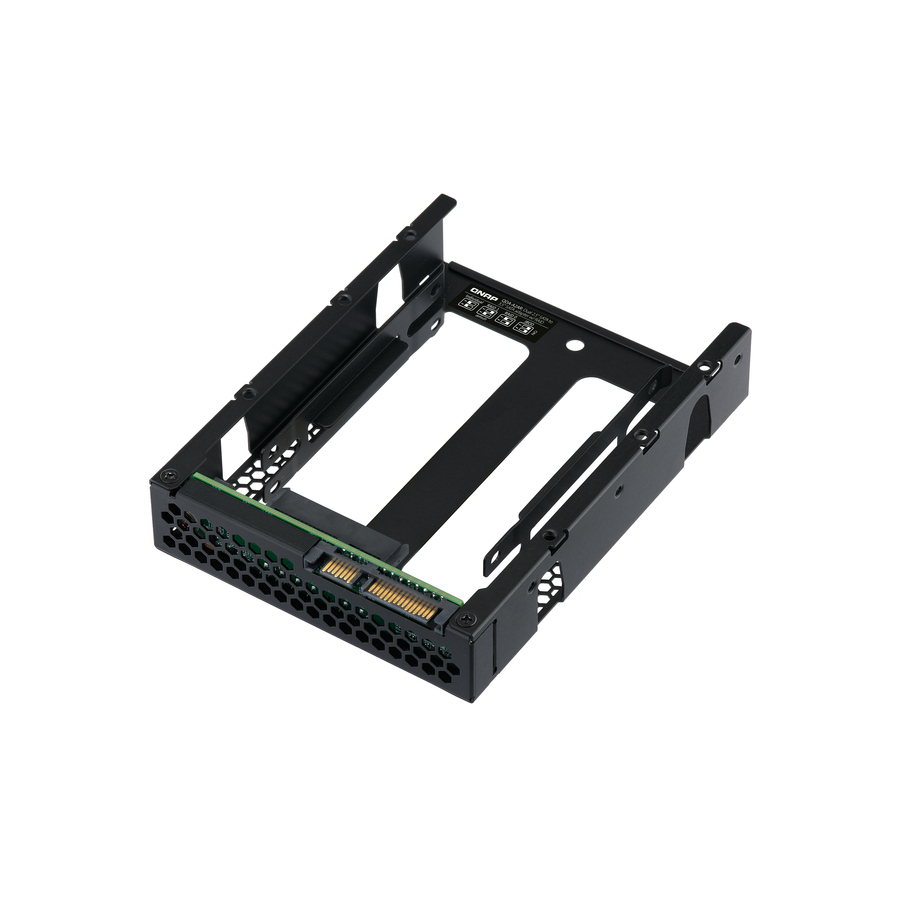
Use two M.2 SATA SSDs in a single 2.5-inch SATA drive bay with RAID support for PC and NAS
The QDA-A2MAR can accommodate two M.2 SATA SSDs within a single 2.5-inch SATA drive bay. No software driver is required for the QDA-A2MAR, and it can be installed in a PC/workstation (Windows®, Linux®) or QNAP NAS to flexibly add high-performance M.2 SATA SSDs with RAID configurations to meet various storage needs.
Use two M.2 2280 SATA SSDs in a single 2.5-inch drive bay. (M.2 SSDs sold separately)
Up to 6 Gb/s file transfer speeds. Can be the primary bootable device containing for PCs.
Choose a hardware RAID group with the disk mode switch.
Supports various RAID levels
The QDA-A2MAR supports a variety of RAID configurations. Depending on your requirements, you can use the bundled metal pin as disk mode switch tool to select your ideal RAID mode: Individual, JBOD, RAID 0, or RAID 1. Windows® users can use the QNAP External RAID Manager utility to view the RAID group status and disk health information.
Individual Mode A PC that supports SATA port multipliers can connect two SATA drives to a single SATA port, allowing you to independently access each disk as separate storage space.
RAID 1 Mode (Default) Half of the total storage capacity is used to store data, and the other half keeps a copy of this data. This provides high data protection at the cost of only being able to use half the installed storage space.
RAID 0 Mode Data is split amongst the drives. RAID 0 provides the fastest performance but does not protect data from drive failure.
JBOD Mode All the drives are recognized as a single drive. This allows maximal storage utilization but provides no data protection.
Install in a PC/workstation for higher performance or data protection
When using two M.2 SSDs instead of a single 2.5-inch drive in a PC/workstation (Windows® or Linux®) you can create a RAID 0 for enhanced performance, or RAID 1 to add data redundancy for greater data protection. The M.2 SSDs also help achieve maximized performance and lower latency, ideal for on-the-fly video editing and server-grade applications.
External RAID Manager for Windows users
The QNAP External RAID Manager utility allows Windows® users to view the drive status and RAID information of the QDA-A2MAR. Firmware updates for the QDA-A2MAR can also be managed with the External RAID Manager utility.
Install in QNAP NAS for efficient storage or SSD caching
The QDA-A2MAR supports hardware RAID that will not consume CPU resources to help sustain optimal NAS performance. You can install one or more QDA-A2MAR in a NAS to maximize the storage utilization of available 2.5-inch drive bays. The QDA-A2MAR can accommodate two M.2 SSDs to create an SSD volume for performance-demanding workflows or work in an efficient tiered-storage environment with Qtier. It can also boost IOPS performance when configuring SSD caching. RAID information and disk health of the QDA-A2MAR can be monitored through the QTS Storage & Snapshots Manager.
| Controllers | |
|---|---|
| Controller Type | Serial ATA/600 |
| RAID Supported | Yes |
| RAID Levels | 0, 1, JBOD |
| General Information | |
| Manufacturer | QNAP Systems |
| Manufacturer Part Number | QDA-A2MAR |
| Brand Name | QNAP |
| Product Model | QDA-A2MAR |
| Product Name | QDA-A2MAR DAS Storage System |
| Product Type | DAS Storage System |
| I/O Expansions | |
| Number of Total Expansion Bays | 2 |
| Interfaces/Ports | |
| Drive Interface | M.2 |
| Host Interface | SATA/600 |
| Physical Characteristics | |
| Form Factor | Internal |
| Storage | |
| Number of Solid State Drive Supported | 2 |
| Number of Solid State Drive Installed | No |
| Miscellaneous | |
| Country of Origin | Taiwan |
Matched on SATA
Send a bill of materials or part numbers — we confirm stock and a below-market total, with TAA verified on request. No payment up front.