
Ollama vs llama.cpp vs vLLM on DGX Spark: How to Test User Capacity
Compare Ollama, llama.cpp and vLLM on NVIDIA DGX Spark using realistic AI workloads. Learn how to test concurrent requests, response times, throughput and answer quality to evaluate user capacity.
By Uniqcli Team · · 12 min read · Updated
Key takeaways
- Compare Ollama, llama.cpp and vLLM using the same representative workloads, not advertised speed or user-capacity claims.
- Define acceptable response times, answer quality and concurrent-request targets before running benchmarks.
- Record model versions, quantization, context limits, batching and runtime settings so results can be compared fairly.
- Measure time to first token, p50/p95 latency, throughput, errors and answer quality as concurrent requests increase.
- Use measured results to decide whether one DGX Spark meets your workload or whether another configuration or independent replica needs testing.
On this page
Choosing between Ollama, llama.cpp and vLLM on NVIDIA DGX Spark involves more than comparing token-generation speeds. A runtime that performs well for a single user may behave differently when several people submit requests simultaneously. The right choice depends on your models, workloads, response-time expectations and the quality of the answers.
For IT teams evaluating local AI infrastructure, user capacity is especially important. Four employees asking occasional questions create a different workload from four coding assistants processing long prompts continuously. Rather than relying on a fixed number of supported users, it is more useful to measure how each runtime handles realistic request patterns as demand increases.
A meaningful comparison should consider time to first token, total response time, throughput, failed requests and answer quality. Model size, quantization, context length and batching settings also influence results, so these details need to be documented before drawing conclusions.
This guide outlines a practical benchmarking approach for Ollama, llama.cpp and vLLM on a single 128 GB DGX Spark. It explains how to configure comparable tests, measure concurrent-request performance and interpret the results when planning local AI capacity. The methodology is proposed for evaluation; Uniqcli has not independently benchmarked these configurations or established a winning runtime.
Define the Service Target First
Before comparing Ollama, llama.cpp and vLLM on DGX Spark, define what the AI system needs to accomplish. A runtime that works well for short conversations may perform differently when handling long engineering documents, code generation or multiple requests at once. Start with the tasks your team expects to run most often.
Create a small set of representative prompts and record the expected response length for each. For document-based questions, evaluate whether answers include correct source citations. For coding tasks, use independent tests to check whether the generated code works. This helps ensure that faster responses do not come at the expense of useful results.
Next, establish acceptable performance targets. For example, a team might aim for 95% of short-chat requests to receive their first token within three seconds while four clients are active. This is an illustrative benchmark target, not a measured DGX Spark result. Also define acceptable total completion times, answer quality and failure rates.
Distinguish between concurrent requests and total users. Eight employees who ask occasional questions create less sustained demand than eight automated coding agents submitting requests continuously. Record how frequently clients send prompts, whether requests arrive together or at intervals, and how much time users typically spend between requests.
These requirements become the baseline for evaluating each runtime. Instead of asking how many users DGX Spark can support in general, the benchmark should determine how many simultaneous requests a specific model and configuration can handle while meeting your team's performance and quality targets.
Compare Complete Configurations
Ollama, llama.cpp and vLLM can all serve local AI models, but they offer different configuration options and approaches to handling requests. A useful DGX Spark comparison should evaluate the complete setup, including the model, runtime settings and supported acceleration features, rather than assuming one tool will always be faster.
Ollama provides a relatively straightforward way to run and manage local models. It supports parallel requests and can queue additional work when its configured capacity is reached. Settings for parallelism, context length and request queues affect memory usage and response times, so record them during testing.
llama.cpp offers flexible local inference with support for multiple model formats and hardware backends. Its performance depends on the selected model file, quantization, context size, GPU offloading and server configuration. NVIDIA provides a DGX Spark workflow that can serve as a starting point, but the active backend and settings should be confirmed before collecting results.
vLLM focuses on model serving and includes features such as continuous batching to manage multiple requests. NVIDIA provides DGX Spark deployment guidance, including single-device and two-device configurations. These features may be useful for concurrent workloads, but their benefits should be measured against the actual request pattern.
For a fair evaluation, run two types of comparisons:
Comparable settings: Use equivalent model weights, precision, context limits and generation settings wherever supported. Document any differences that cannot be eliminated.
Supported deployment settings: Configure each runtime using a suitable, supported setup for the intended workload. This shows how the complete deployments perform in practice, even when their configurations differ.
Model formats, quantization methods and acceleration features can affect both speed and answer quality. Results from different model variants should not be presented as a direct comparison of runtime performance alone.
Start with a modest model that runs correctly in all three environments. Once the baseline is established, repeat the evaluation with a larger model relevant to your team's work. Verify model compatibility separately for each runtime rather than assuming that a checkpoint supported by one will work identically in the others.
Save the Settings Used for Each Test
A reliable benchmark needs more than a final performance score. To compare Ollama, llama.cpp and vLLM on DGX Spark fairly, record the exact hardware, software and model configurations used in each test. Even small changes to model precision, context length or batching can affect memory consumption and response times.
Start with the hardware and software environment. Record the DGX Spark SKU and memory capacity, operating system, driver versions and runtime version. If you use containers, save the container image digest. For builds from source, record the specific commit so the configuration can be reproduced later.
Next, document the model and inference settings. Include the model revision and file hashes, tokenizer, chat template, quantization or weight precision, context window, sampling parameters and maximum output length. Where applicable, record the KV-cache precision and tool-call parser. These details help explain differences in speed, memory usage and generated answers.
Runtime-specific features also matter. Record batching limits, parallel-request settings, prefix caching, speculative decoding and any operations assigned to the CPU. Check the runtime logs to confirm which execution backend is actually active. A model may return valid responses while using a different processing path than expected.
For the initial comparison, run each configuration without unrelated workloads competing for system resources. Then repeat selected tests with the services your team expects to operate alongside inference, such as document indexing or another AI model. This helps identify how shared workloads affect available memory and response times.
Finally, preserve the exact launch commands, configuration files and test conditions used for each run. Keep them alongside the benchmark results rather than replacing them with newer settings after testing. This creates a reproducible baseline for evaluating future software updates, model changes or hardware configurations.
Test Representative Workloads at Increasing Load
Once the configurations are documented, test how Ollama, llama.cpp and vLLM perform as the number of simultaneous requests increases. The goal is to understand how each setup handles realistic demand, not simply to find the highest token-generation speed.
Start with your team's primary workload, whether that's short conversations, engineering document questions or coding assistance. If you test multiple use cases, keep their results separate. Match prompt lengths and requested output lengths as closely as possible across runtimes, and record the actual input and output token counts. Note when a model finishes before reaching its output limit.
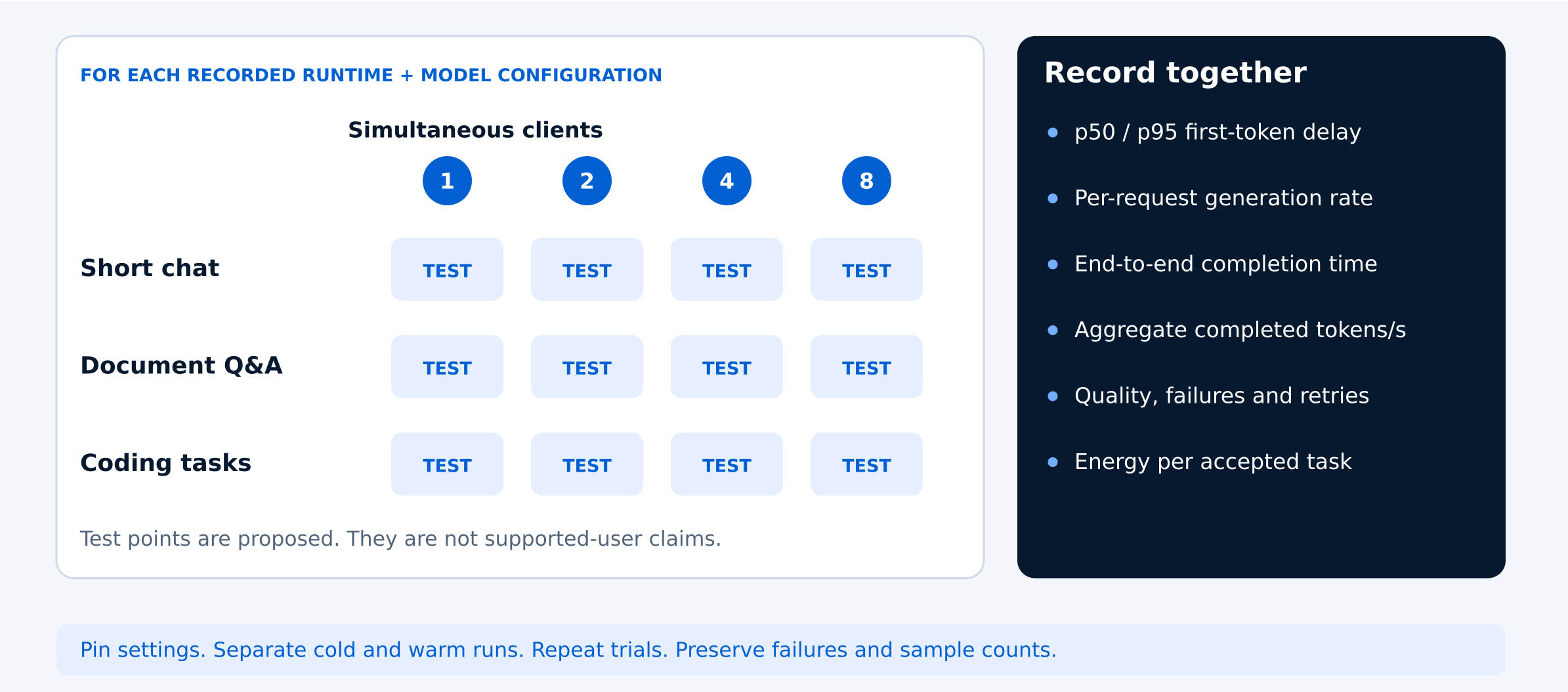
For each workload, begin with one active client, then increase to two, four and eight simultaneous clients, where the configuration can support them. These are proposed test levels, not verified DGX Spark user-capacity limits. Record whether requests arrive together, at staggered intervals or continuously.
Measure model startup separately from normal inference. After a consistent warm-up period, run at least three trials at each load level. Record the number of attempted requests and differences between runs. Use a sufficiently large sample to evaluate slower responses; a few successful requests are not enough to establish reliable 95th-percentile latency.
Include both unique prompts and a separate test where requests share a common prefix. Repeated prompts can benefit from caching and make a configuration appear faster than it would under everyday use. Keep cached and uncached results clearly separated.
As concurrency increases, monitor response times, throughput, memory usage and request failures. Record every attempted request, including rejected requests, timeouts, incomplete responses and out-of-memory errors. A configuration should not appear more efficient simply because unsuccessful requests were excluded from its results.
Finally, repeat selected tests with realistic background services running, such as document indexing or another local AI workload. Comparing isolated and shared-resource results helps determine whether the configuration can meet performance targets in the environment where your team intends to use it.
Measure Response Time, Throughput and Answer Quality
A useful DGX Spark benchmark should measure more than how quickly a model generates tokens. When comparing Ollama, llama.cpp and vLLM, evaluate response time, overall throughput, answer quality and failed requests together. A configuration that produces more tokens per second may still deliver a slower or less reliable experience for individual users.
Start with time to first token (TTFT), measured from when the client submits a request until it receives the first generated token. This should include any time spent waiting in a queue. If the runtime exposes server-side queue metrics, record those separately to understand where delays occur.
Next, measure end-to-end completion time, per-request token-generation speed and the time between generated tokens. For overall throughput, calculate the total completed output tokens divided by the elapsed wall-clock time. Use tokenizer or server-reported token counts rather than counting streaming events, since a single streamed chunk may contain multiple tokens.
Report both median (p50) and 95th-percentile (p95) response times. The median represents typical performance, while p95 helps reveal slower requests that users may experience under load. Higher aggregate throughput does not necessarily mean every user receives a faster response.
Answer quality is equally important. For coding workloads, measure whether generated code passes independent tests and how long it takes to produce an accepted patch. For document-based questions, check whether answers are accurate and cite the correct sources. Record the number of accepted responses alongside latency and throughput results.
Include all failed requests in the benchmark record, including timeouts, rejected requests, incomplete outputs and out-of-memory errors. Report failure rates separately from successful-request timings so an unstable configuration does not appear faster simply because it completed fewer requests.
If power consumption matters to your infrastructure decision, measure electricity usage at the wall over a defined test period. This can help compare the energy required to complete equivalent workloads, provided the measurement conditions are consistent.
Taken together, these metrics show whether a runtime meets your team's actual service requirements rather than simply achieving an impressive benchmark number.
Use these ten checks to validate your Ollama, llama.cpp and vLLM benchmark results on DGX Spark. Record the results for each configuration before comparing performance or estimating user capacity.
- Define the workload, response-time targets and acceptable answer quality before testing.
- Record the exact DGX Spark hardware, software versions and runtime configurations.
- Verify model compatibility, quantization, context limits and generation settings.
- Confirm the active inference backend and document batching, caching and parallelism settings.
- Test one, two, four and eight simultaneous clients where feasible.
- Separate startup and warm-up measurements from normal inference results.
- Test unique prompts and shared-prefix requests as separate scenarios.
- Record p50/p95 latency, time to first token, completion time and throughput.
- Track answer quality, timeouts, rejected requests and out-of-memory errors.
- Save raw results, failed examples and configuration details for reproducibility.
Decide How Much Capacity You Need
Once you've completed the benchmarks, use the results to determine which Ollama, llama.cpp or vLLM configuration meets your team's requirements. The best choice isn't necessarily the runtime with the highest token-generation speed. It's the simplest reliable configuration that delivers acceptable answer quality, response times and throughput for your actual workload.
Compare each configuration against the performance targets established before testing. Identify the highest tested concurrency level that met your requirements without unacceptable delays, failed requests or reduced answer quality. Avoid converting that result into a universal supported-user count, since capacity depends on how frequently users submit requests and how demanding those requests are.
If a configuration struggles with a single request, investigate model size, prompt length, context settings and the active inference backend before adding hardware. If single-request performance is acceptable but queues grow as more clients become active, consider testing a second independent model-serving replica. Separate replicas may help distribute requests without requiring one model to be divided across multiple systems.
Running a model across two DGX Spark systems is a different deployment approach and requires its own compatibility and performance testing. NVIDIA documents a two-system vLLM workflow, but connecting additional DGX Spark devices does not automatically establish that a particular model or serving configuration can operate across all of them.
For each tested configuration, create a capacity summary that includes the runtime, model version, workload, concurrency level, number of requests, p50/p95 time to first token, completion time, aggregate throughput, error rate and answer-quality score. Include a clear pass-or-fail result against your original service targets.
Preserve the raw request logs, configuration files and failed examples so future software updates or model changes can be evaluated against the same baseline. Remove credentials, sensitive prompts and confidential information before sharing benchmark records.
When discussing local AI infrastructure with Uniqcli, share the model and runtime you tested, representative tasks, expected request volume, response-time requirements and the highest concurrency level that met your targets. Include quality scores and failures alongside performance results. This information can help determine whether to optimize the current configuration, evaluate another DGX Spark or consider a different infrastructure approach.
Ultimately, the goal is not to prove that one runtime is universally better. It's to identify a reproducible configuration that supports your team's workload reliably and provides a practical basis for future capacity planning.
Frequently asked questions
Which is better for DGX Spark: Ollama, llama.cpp or vLLM?
There is no single best runtime for every DGX Spark workload. Ollama offers a straightforward local model-management experience, llama.cpp provides flexible inference and quantization options, and vLLM includes serving features designed for concurrent requests. Compare each using compatible models, representative prompts, response-time measurements and answer-quality checks before choosing a configuration.
How many concurrent users can NVIDIA DGX Spark support?
DGX Spark does not have one universal concurrent-user limit. Capacity depends on model size, context length, runtime settings, request frequency and acceptable response times. Test increasing levels of simultaneous requests and record the highest load that meets your latency, quality and reliability targets. Active requests should not be confused with the total number of people who have access to the system.
Is vLLM faster than Ollama or llama.cpp on DGX Spark?
vLLM includes features such as continuous batching that can benefit certain concurrent workloads, but this does not guarantee faster performance in every situation. Model format, precision, prompt length, batching and hardware execution settings can change the outcome. Compare time to first token, p95 latency, throughput, errors and answer quality under equivalent test conditions.
What metrics should I measure when benchmarking local AI inference?
Measure time to first token, end-to-end completion time, output-token throughput, median (p50) and 95th-percentile (p95) latency, and failed-request rates. Include answer-quality checks and record the model, runtime settings and concurrency level for each test. These measurements provide a more useful picture of performance than tokens per second alone.
When should I add a second DGX Spark for AI inference?
Consider testing a second DGX Spark when a single system meets your answer-quality and single-request latency targets but struggles with queues or throughput under concurrent demand. An independent serving replica may help distribute requests. Running one model across two systems is a separate configuration that requires compatibility checks and benchmarking. Adding hardware does not automatically improve every workload.
Find the Right DGX Spark Setup for Your AI Workload
Evaluating Ollama, llama.cpp or vLLM for local AI inference? Share your model requirements, expected concurrent requests, response-time targets and infrastructure needs with Uniqcli. Our team can help you evaluate DGX Spark configurations and supporting hardware for your workload.
Sources
- 1.Ollama — FAQ: Parallel Requests, Queues and Context Settingsdocs.ollama.com
- 2.NVIDIA — llama.cpp on DGX Sparkbuild.nvidia.com
- 3.NVIDIA — vLLM on DGX Sparkbuild.nvidia.com
- 4.NVIDIA — Multi-System vLLM Deployment Guidebuild.nvidia.com
- 5.NVIDIA — Connecting Multiple DGX Spark Systemsbuild.nvidia.com
- 6.vLLM — Official Documentationdocs.vllm.ai