What 16-, 32-, and 36-node DGX Spark clusters actually prove
What do large DGX Spark clusters really demonstrate? Explore a 16-system GB10 build, reported performance, and what smaller teams should consider before buying.
By Uniqcli Team · · 6 min read
Key takeaways
- A 16-system GB10 cluster demonstration does not automatically establish the performance or value of a larger deployment.
- Benchmark results depend on the model, software version, network configuration, concurrency and output quality.
- Small teams should test one system first, then consider additional DGX Spark systems only when their workload justifies them.
On this page
A large DGX Spark cluster makes an impressive video, but a purchase decision needs more detail. Which machines ran the workload? How was the model distributed, how long did users wait, and could another owner reproduce the result?
A community project by ciprianveg brought together 16 ASUS GX10 systems in a GB10 cluster. The build uses a 100Gbps network switch, with the exact topology and software configuration documented across the project's updates. A later NVIDIA Developer Forum update describes a working two-switch arrangement; the topology needs to be associated with the specific run being discussed.
The 16-system ASUS GX10 build
The linked Cloud Codes video highlights ciprianveg’s GB10 cluster project. The original build used sixteen ASUS GX10 systems, a MikroTik CRS804-4DDQ switch, and four 400G-to-four-100G breakout cables. That arrangement connected each machine at 100Gb/s. The switch-side cable rating did not turn each endpoint into a 400Gb/s device. A later update describes a working two-switch arrangement; the topology needs to be associated with the specific run being discussed.
The build runs Kimi-K3, which Moonshot lists as a mixture-of-experts model with 2.8 trillion total parameters and 104 billion activated parameters. The total parameter count matters when planning storage and memory; the activated count describes how much of the model participates in processing each token.
The project’s v5-prd configuration distributes the model across 16 systems and uses speculative decoding. The setup uses different numerical formats and network optimizations to run the model across multiple systems. These details matter because performance can change depending on the software version, network configuration and how the model is launched. The maintainer lists approximately 1.56 TB of model weights stored on NFS, a network file system.
The following results are reported by the project maintainer for its v5 configuration. They are not Uniqcli measurements or performance guarantees for other installations.
Reported benchmark results
- Coding, one stream, 3,000-token generation
- 29.81 tokens/s
- Coding, eight streams
- 87.12 tokens/s combined; 10.89 tokens/s per stream
- Coherent prose, 100K context
- 21.13 decode tokens/s
These figures come from the same v5 snapshot, but measure different workloads. Combined throughput across eight streams is not the speed experienced by each user. Keep each result attached to its workload, concurrency and software configuration.
The correction is part of the result
Earlier numbers need particular care. The builder subsequently explained that repetitive output had inflated speculative-decoding acceptance in the first results. Corrected coding performance was lower. That correction belongs beside any discussion of the original headline.
A separate owner, DropTheBeat, reported a change from 1.3 to 8.9 tokens/s after resolving a TCP fallback and exposing RDMA, without speculation. This was a different sixteen-node installation using v4-prd. These results came from different installations and software versions, so they cannot show the improvement achieved by upgrading one system.
Read the generated output when checking performance. Repeated text, failed tool calls and incorrect answers can make a fast response unusable. Save complete outputs, including failed runs, alongside the timing logs so you can judge speed and usefulness together.
What the larger cluster plans show
The All Spark project is a separate deployment. Its owner describes expanding to 36 systems to run several models and supporting services at once, rather than one model across all 36. That distinction matters: a larger installation can increase the number of workloads running simultaneously without demonstrating faster inference for a single model.
A claim about single-model inference across 32 or 36 systems needs more than an equipment list. Look for the participating machines, network layout, launch configuration, workload, complete outputs and repeatable timing results.
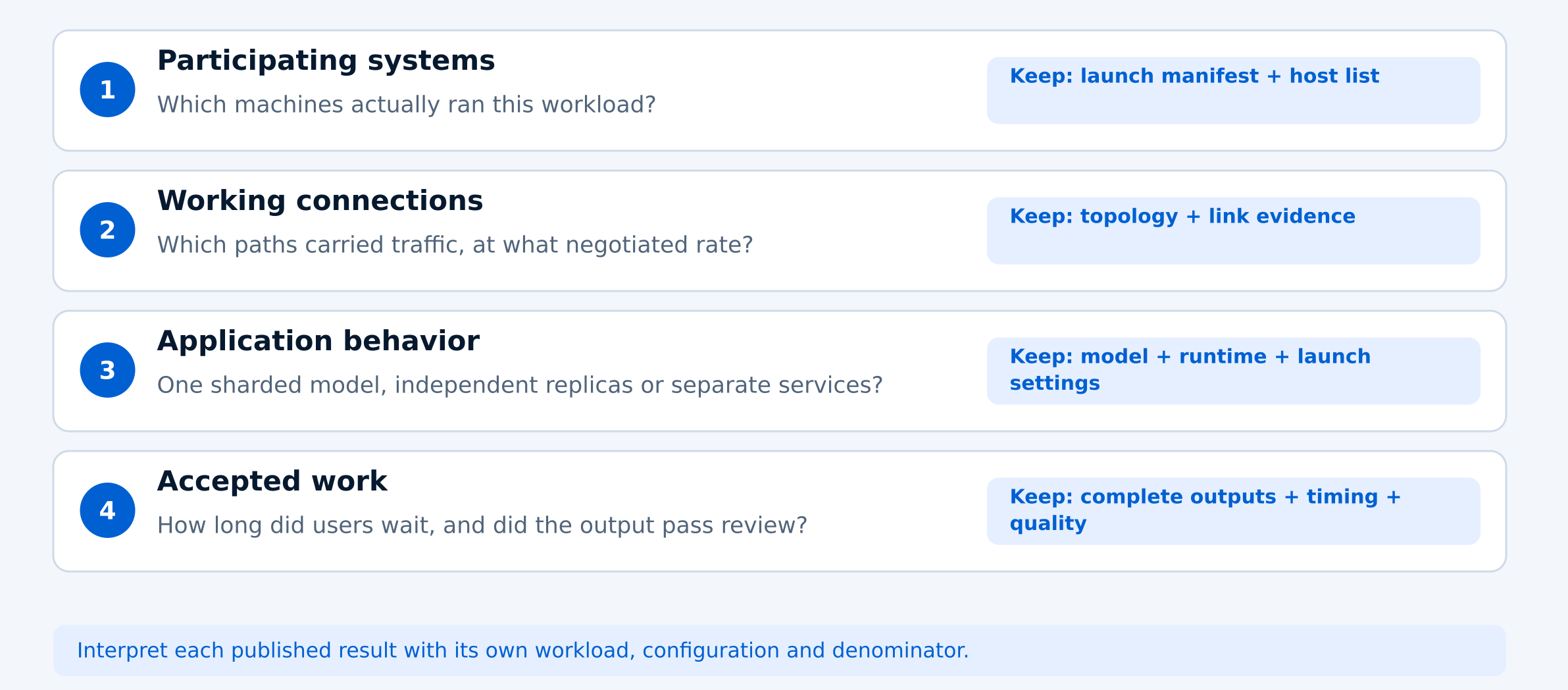
Read a cluster demonstration in four layers
- First, establish inventory. Count the machines participating in the workload, excluding spare systems and other servers visible in the rack.
- Second, establish connectivity. A port map and negotiated speeds tell you more than connector labels. Ask whether storage and inference share constrained paths and whether the network was loaded concurrently during testing. For smaller deployments, our DGX Spark multi-node connection guide covers the cabling, network layout and validation checks involved in connecting two or four systems.
- Third, establish application behavior. A single sharded model, several independent replicas, and separate embedding or generation services represent different deployments. Their memory and throughput totals cannot be interpreted interchangeably.
- Finally, check whether the output is useful. Record time to first token, per-request generation speed, completed work, errors, and quality under the intended concurrency. A long prompt may spend substantial time being processed before the first visible answer. A fast-looking stream leaves that waiting period invisible. For buyers, the goal is not to reproduce the largest cluster. It is to identify the smallest configuration that meets the required model capacity, response time and workload demands.
What should a small team buy?
Start by writing the job in one sentence: for example, “Four engineers need cited answers from our manuals during working hours.” Then specify what counts as an acceptable answer and an acceptable wait. These requirements give you something concrete to test before buying.
Evaluate one system first when the target model fits. Consider two independent replicas when simultaneous requests are the constraint. Consider a sharded pair when a matching recipe offers a relevant capacity or latency benefit.
For teams considering a multi-node deployment, start with a tested two- or four-system configuration and verify networking, software compatibility and workload performance before planning a larger cluster.
Recommended configuration
- One DGX Spark
- The model fits and performance meets the workload
- Two independent systems
- Multiple users or background jobs create queues
- Two systems running one distributed model
- A supported configuration offers a demonstrated memory or performance benefit
- Three or four systems
- Testing shows a smaller setup cannot meet requirements
NVIDIA’s current setup assistance covers up to three directly connected systems or four through a switch, while its vLLM serving walkthrough uses two. These documents cover different tasks: setting up the network and running a specific two-system serving configuration.
Before moving beyond four nodes, require evidence that a smaller configuration misses the target. Budget operator time, restart behavior, model-loading storage, measured wall power, and room cooling alongside the machines. Assign an owner for software updates and failed runs. Decide whether downtime can wait until morning or needs an immediate response.
Use community builds to understand what your own configuration needs to demonstrate. For an introduction to the hardware, explore our desktop AI overview.
Frequently asked questions
How many DGX Spark systems do you need to run large AI models?
The number depends on the model's memory requirements, context length and performance targets. A model that fits on one DGX Spark may not benefit from additional systems. Larger models may require distributing the workload across multiple devices. Start with the smallest configuration that supports your model and test it under realistic conditions before expanding.
Does a 16-node DGX Spark cluster perform 16 times faster than one system?
No. Adding systems does not guarantee proportional performance gains. Results depend on how the model is distributed, network bandwidth, software configuration and the number of simultaneous requests. A 16-node demonstration proves that a particular workload can run across those systems, but it does not establish a universal speed improvement.
Is it better to buy one DGX Spark or two?
Start with one DGX Spark if your target model fits and response times meet your requirements. Two independent systems may help when multiple users or background jobs create queues. A distributed two-system configuration may be useful when a supported setup demonstrates a memory-capacity or performance benefit. The right choice depends on actual workload testing.
Does a 32- or 36-node DGX Spark cluster necessarily run one AI model faster?
No. A larger cluster may support more simultaneous workloads, independent model replicas or supporting services. Faster inference for one model must be demonstrated with a specific configuration, workload, latency measurements and validated output.
What should a small team test before purchasing multiple DGX Spark systems?
Start with the intended model and a representative workload on one system. Measure response time, concurrent requests, output quality and operational requirements. Consider additional systems only when testing shows that the smaller configuration cannot meet those needs.
Planning a DGX Spark deployment?
Tell us which AI models you plan to run, how many users you need to support, and your performance requirements. Uniqcli can help you explore suitable hardware configurations.
DGX Spark and GB10 systems to evaluate
NVIDIA
NVIDIA DGX Spark 128GB 4TB GB10 Grace Blackwell AI Desktop
$7,724.98In stockASUS Computer International
Asus Ascent GX10-GG0010BN Desktop AI Computer
$7,831.33In stock