
Short answer
An FDM printer melts filament through a 0.4 mm nozzle and stacks it in 20 to 200 micron layers; a resin printer cures liquid photopolymer under UV light in 25 to 200 micron layers. Choose FDM for load-bearing parts, larger builds, wider materials and a classroom or office; choose resin for fine detail, smooth surfaces and small isotropic parts, and budget a wash, a UV cure and PPE on every part.
Key facts
- ISO/ASTM 52900 defines the process categories: FDM and FFF (one process, two names) are material extrusion; SLA, DLP and MSLA are vat photopolymerization.
- An engineering FDM desktop prints 20–200 µm layers with a 0.4 mm nozzle (UltiMaker S3); a resin printer cures 25–200 µm layers at a 50 µm pixel (Form 4).
- FDM parts are anisotropic and weakest across the layer bond, so orientation is a design input; resin layers cross-link chemically and the part is isotropic.
- A desktop FDM builds larger, 230 × 190 × 200 mm against 200 × 125 × 210 mm on a desktop resin printer; a large-format FDM reaches 305 × 305 × 605 mm.
- Every resin part needs a solvent wash, usually isopropyl alcohol, and a UV post-cure before use; an FDM part needs its supports removed and, at most, sanding.
- NIOSH's 3D-printing guide for schools and libraries covers both processes and ranks a ventilated enclosure or local exhaust ahead of PPE.
A fused deposition (FDM, also sold as FFF) printer pushes a thermoplastic filament through a heated nozzle and lays it down in layers that fuse as they cool. A resin printer holds liquid photopolymer in a tank and cures it, one layer at a time, with ultraviolet light from a scanning laser (SLA), a projector (DLP) or a masked LCD (MSLA). ISO/ASTM 52900, the additive-manufacturing vocabulary standard, files the first under material extrusion and the second under vat photopolymerization. Both are sold as 3D printers and both start from the same STL file; everything after that differs: the layer thickness, the materials, how the part behaves under load, how large it can be, what has to happen to it after it leaves the build plate, and what the room needs.
The practical split is by the part, not by the brand. Parts that carry load, take an impact, fit an assembly or are simply large are FDM work, printed in PLA, PETG, ABS, nylon, polycarbonate or a carbon-filled composite on a machine that can share an office or a classroom. Parts whose value is in their surface and their detail, such as masters, patterns, dental and anatomical models, scale models and small tight-tolerance components, are resin work, and every one of them arrives with an isopropyl-alcohol wash, a UV post-cure, gloves, eye protection and a ventilated bench. This page puts the two side by side on the factors a procurement officer or lab manager actually decides on, then names the FDM systems Uniqcli lists on this site. Resin systems are quoted on request.
At a glance
Side by side
| Factor | FDM / FFF (filament) | Resin (SLA / DLP / MSLA) |
|---|---|---|
| Process (ISO/ASTM 52900) | Material extrusion: a heated nozzle melts thermoplastic filament and deposits it in layers that fuse as they cool | Vat photopolymerization: a laser, a projector or a masked LCD cures liquid photopolymer in a tank, one whole layer at a time |
| Layer height (OEM specs) | 20–200 µm through a 0.4 mm nozzle on the UltiMaker S3 (60–150 µm on its 0.25 mm core, 20–600 µm on its 0.8 mm core); 100–400 µm on the MakerBot Sketch; 10–250 µm on the Raise3D Pro2 Plus | 25–200 µm on the Formlabs Form 4, defined by a 50 µm light-pixel rather than a nozzle; layer lines are close to invisible at the fine end |
| Detail and surface finish | Visible layer lines; small text, thin walls and sharp corners are limited by the nozzle diameter; sanding or vapor smoothing to hide the layers | Smooth surfaces straight from the wash; fine text, thin walls and crisp edges reproduce, which is why masters, patterns and dental models are resin work |
| Materials | PLA and Tough PLA, PETG, ABS, ASA, CPE, nylon, polycarbonate, TPU, PP, water-soluble PVA and breakaway supports, carbon- and glass-filled composites; 1.75 mm or 2.85 mm filament; the UltiMaker S3 lists 190+ compatible materials | Standard, tough and durable, rigid glass-filled, flexible and elastomeric, high-temperature, castable and biocompatible resins, each formulated and validated for one printer family |
| Part strength and isotropy | Anisotropic: strongest along the extruded bead and weakest across the layer bond, so print orientation is a design input; engineering thermoplastics take impact well | Isotropic: layers cross-link chemically, so properties do not change with orientation; standard resins are brittle under impact and tough resins narrow that gap |
| Build volume at the desk | Larger: 150 × 150 × 150 mm on the MakerBot Sketch, 230 × 190 × 200 mm on the UltiMaker S3, 305 × 305 × 605 mm on the Raise3D Pro2 Plus | Smaller: 200 × 125 × 210 mm on the Formlabs Form 4; large-format resin (353 × 196 × 350 mm on the Form 4L) is a separate class of machine |
| Post-processing | Remove supports (breakaway, or dissolve PVA in water); optional sanding; the part can be handled as it comes off the plate | Wash in isopropyl alcohol to strip uncured resin, UV post-cure to reach final properties, then clip supports and sand the marks; the wash and cure units belong on the same purchase |
| Safety and ventilation | Hot nozzle (180–300 °C) and heated bed, moving parts, and ultrafine particles and vapors from molten plastic; PLA prints coolest; an enclosed printer with particulate or HEPA-and-carbon filtration is the engineering control | Liquid resin is a skin and eye irritant and the wash solvent is flammable; nitrile gloves, eye protection, a ventilated bench and a disposal route for waste resin and IPA are the baseline |
| Operating cost | Filament by the kilogram; the lowest cost per part on simple prototypes; consumables are nozzles and build surfaces | Resin by the liter plus IPA, gloves, tank film and the wash and cure hardware; more hands-on minutes per part |
| Failure recovery | Pause and resume; the Raise3D Pro2 Plus carries a filament run-out sensor and power-loss recovery | A failed print is normally a restart, and the tank has to be checked and cleared of cured debris before the next run |
| Classroom, library and office | The default: fully enclosed PLA systems with a particulate filter, a cloud print queue and lesson content; Tough PLA for sturdier student parts | Workable in a supervised lab with a ventilated wash and cure bench and PPE; a poor fit for a shared classroom desk |
| Engineering prototypes | Fit and load checks, enclosures, brackets, jigs and fixtures, dissolvable-support assemblies, end-use parts in nylon, PC or composites | Form and visual models, masters and patterns, small tight-tolerance parts, mold inserts, anatomical and dental models |
How the two processes build a part
An FDM printer extrudes molten plastic through a nozzle, layer on layer. Filament feeds through a heated nozzle, the nozzle traces one layer of the part, the bed or the head steps by the layer height and the next layer is drawn on top. Two consequences follow from that mechanism. The layer edge is a bead of plastic with a rounded profile, so the surface carries stripes at the layer pitch and small features are limited by the nozzle diameter; and each layer bonds to the one below by heat alone, so the part is weakest across those bonds. Orientation on the plate is therefore an engineering decision on an FDM part: a designer who knows the load path prints the part so that the load runs along the beads rather than across them. The nozzle sets the trade. On the UltiMaker S3 a 0.25 mm print core runs 60 to 150 micron layers for detail and a 0.8 mm core runs up to 600 microns for speed, on the same machine.
A resin printer inverts the picture. The build platform sits in a tank of liquid photopolymer, a light source cures the full outline of one layer at once (a scanning laser on SLA, a projected image on DLP, a masked LCD backlight on MSLA), the platform lifts and the next layer cures against the last. Because the cure is a chemical cross-link that continues across layer boundaries, the finished part has the same properties in every direction, and because the layer is defined by light rather than by a bead of plastic, it can be 25 microns thick with edges that reproduce fine text and thin walls; the Form 4 resolves that outline at a 50 micron pixel. What the mechanism costs is everything that happens afterwards: the part comes off the platform wet with uncured resin and is not finished until it has been washed in isopropyl alcohol and cured under UV.
What each process asks of the room
NIOSH's guide for makerspaces, schools, libraries and small businesses covers both processes. It names ultrafine particles and chemical exposure from molten filament, solvents and liquid resin as the exposures, and heat and moving parts as the safety hazards, and it puts the controls in order: eliminate or substitute the hazard first, then engineering controls, with a ventilated enclosure, a fume hood or local exhaust at the printer ranked above general room ventilation, then administrative rules, with PPE last. In practice that means an enclosed FDM printer with particulate or HEPA-and-carbon filtration running PLA is the low-burden case, which is why the classroom-class machines on this page are built that way, and a resin printer is the case that needs a ventilated bench or hood, nitrile gloves, eye protection, sealed storage for resin and IPA, and a written route for disposing of both.
Floor space follows the same line. An FDM printer needs its own footprint, a spool cabinet and a set of nozzles. A resin printer needs its footprint plus a wash station, a cure station, a drip tray, a supply of IPA and gloves, and a bench kept clear of food and drink; the wash and cure hardware is not optional in practice and belongs on the same quote as the printer.
Choosing for a classroom against an engineering lab
A classroom, library or makerspace with mixed supervision buys FDM, and specifically the enclosed PLA class: a filtered chamber, a print queue a teacher manages from the cloud, a build volume sized for student projects rather than production parts, and a material list deliberately limited to PLA and Tough PLA. The point of that limit is that PLA prints at the lowest nozzle temperature of the common filaments, needs no heated chamber and gives the room nothing to handle beyond a spool. The MakerBot Sketch is that specification in one box: fully enclosed, a particulate filter fitted, a 150 mm cube, a 0.4 mm nozzle on 1.75 mm filament, and 100 to 400 micron layers with a print mode tuned for 200. Two such printers on one queue keep a class moving better than one large one.
An engineering lab buys on material breadth and on the assembly. A dual-extrusion desktop with a water-soluble support material prints an internal channel or an overhanging bracket in one piece, and a print-core range from 0.25 to 0.8 mm trades detail against speed on one machine; the UltiMaker S3 runs its nozzle from 180 to 280 °C and its plate from 20 to 140 °C, which is the span PLA, PETG, ABS, CPE, nylon and TPU need. A large-format enclosed FDM with a 300 °C nozzle ceiling, HEPA-and-carbon filtration and a 305 × 305 × 605 mm chamber, such as the Raise3D Pro2 Plus, adds ABS, nylon and TPU at sizes a desktop cannot reach. Resin belongs in that lab too, for the masters, patterns and small tolerance parts, but as the second machine on a ventilated bench, quoted with its wash and cure units and its consumables.
Choose FDM / FFF when
- The part has to carry load, take an impact or survive heat: brackets, fixtures, jigs, enclosures, end-use parts in nylon, polycarbonate or a carbon-filled filament
- The part is large: a 200 mm-plus footprint or a tall part, up to 305 × 305 × 605 mm on a large-format desktop
- The room is a classroom, library, office or makerspace with mixed supervision, where an enclosed PLA printer with a particulate filter is the whole safety plan
- Material breadth matters: PLA, PETG, ABS, ASA, nylon, PC, TPU, PP and composites, with water-soluble supports for one-piece assemblies
- Cost per part on simple prototypes matters more than surface finish, and a paused or failed print should be resumable
Choose resin when
- The value of the part is in its surface and its detail: masters, patterns, dental and anatomical models, scale models, fine text and thin walls
- The part is small and must be isotropic or hold a tight tolerance in every direction, such as a housing, a connector body or a mold insert
- A plate of many small parts per run is the workload, where curing a whole layer at once beats tracing each part with a nozzle
- A specialty resin is the requirement: castable, flexible, high-temperature or biocompatible
- A supervised lab can provide the ventilated bench, the wash and cure stations, nitrile gloves, eye protection and a disposal route the process needs
Bottom line
Print load-bearing and large parts on FDM; print fine, smooth, small parts on resin — and budget the wash and cure. FDM builds stronger, larger and cheaper parts from a long list of thermoplastics, recovers from a paused or failed print, and fits a classroom or office because an enclosed PLA machine with a particulate filter is the whole safety plan. Resin builds finer, smoother and isotropic parts in layers a fraction of the thickness, at the price of a smaller desktop build volume, brittle standard materials, and a wash, a UV cure, gloves, eye protection and a ventilated bench on every part. Decide from the part's job first: load, size and material point to FDM; surface, detail and small tolerance parts point to resin. Then confirm the room can support the process. The FDM systems priced on this site cover the classroom, the engineering desktop and large-format high-temperature work; resin systems, with their wash and cure hardware, are quoted on request.
Products for this decision
Classroom and library
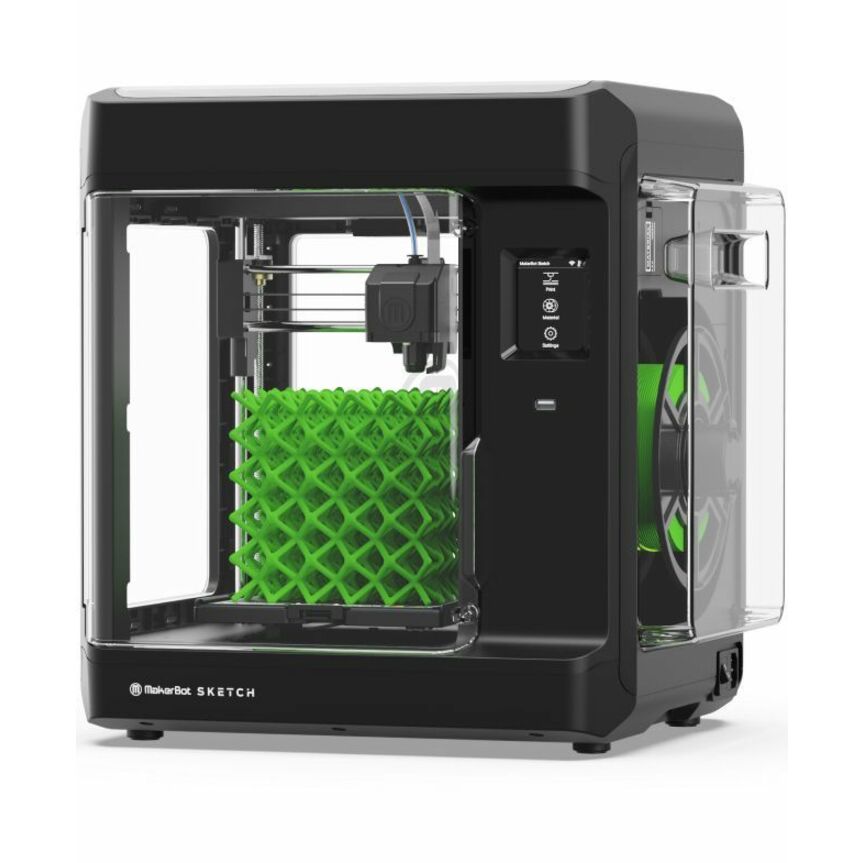
MakerBot Industries
MakerBot Sketch 3D Printer
SKETCHKIT
The MakerBot Sketch is the enclosed PLA and Tough PLA printer built for a shared room: a particulate filter on the chamber, a 150 mm cube, a 0.4 mm nozzle on 1.75 mm filament, wireless LAN and Ethernet, and a cloud print queue a teacher or librarian manages from any desk.
PLA-only by design, which is the material limit that keeps the room's safety plan to an enclosure and a filter.
$1,399.13In stockEngineering desktop
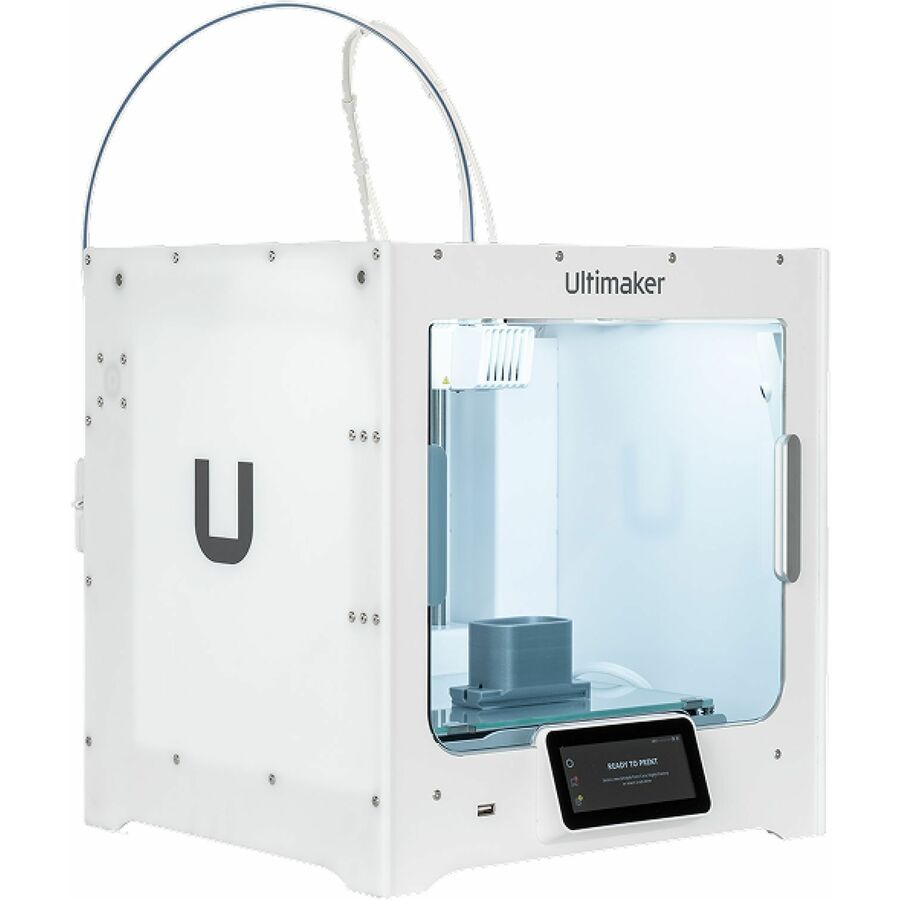
Ultimaker
Ultimaker S3 3D Printer
216932
The UltiMaker S3 is the office engineering FDM printer: a 230 × 190 × 200 mm build volume, dual extrusion for water-soluble PVA supports, swappable print cores from 0.25 to 0.8 mm on 2.85 mm filament, and a material library that runs PLA, PETG, ABS, CPE, nylon and TPU.
Layer height runs 20–200 µm on the standard 0.4 mm core.
$3,384.05Back-orderedLarge-format and high-temperature
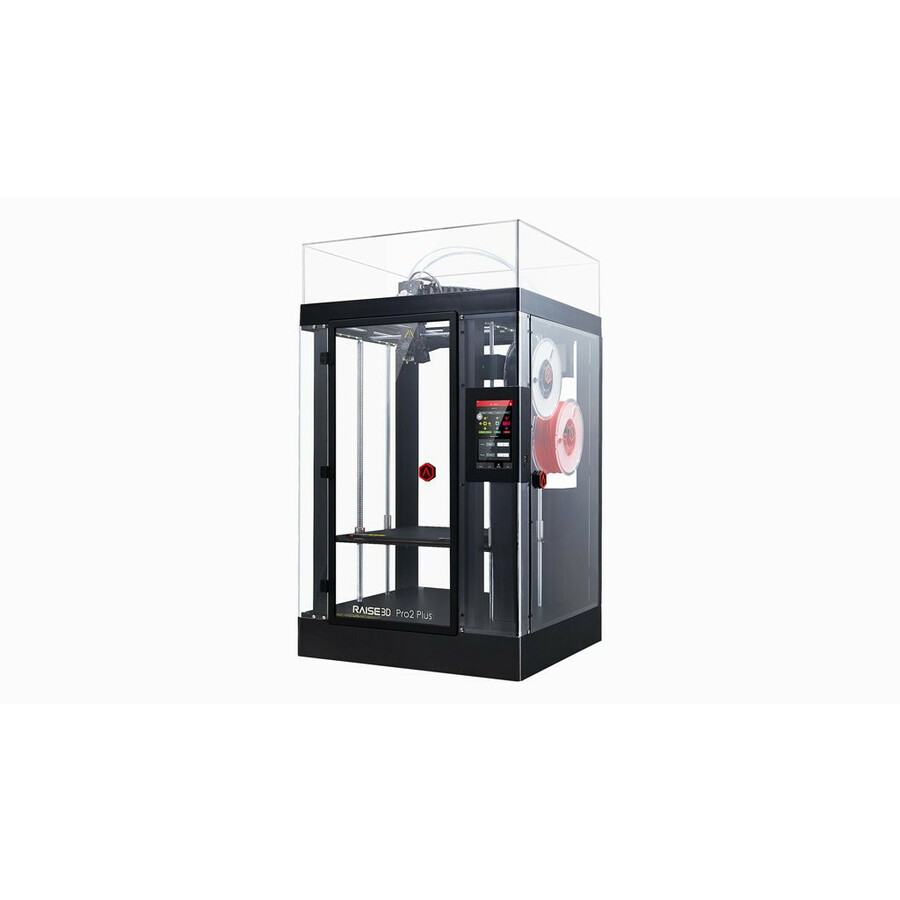
RAISE3D
RAISE3D Pro2 Plus 3D Printer
1.01.017.001
The Raise3D Pro2 Plus adds what a desktop cannot: a 305 × 305 × 605 mm build volume (280 mm wide when both extruders print), dual extrusion with retracting hot ends, a 300 °C nozzle ceiling for ABS, nylon and TPU, HEPA-and-carbon filtration, a filament run-out sensor and power-loss recovery.
$4,179.13Back-orderedFAQ
Common questions
- What is better, FDM or resin?
- Neither is better; they are different processes for different parts. FDM is the choice for functional, larger and lower-cost parts, for a wider list of thermoplastics and for a room without a solvent bench; resin is the choice for fine detail, smooth surfaces and small isotropic parts, at the price of a wash, a UV post-cure and PPE on every part. Decide from the part's job first and from the room second.
- Can resin prints be as strong as FDM?
- Some can, in the right resin. Standard resins are brittle under impact, while tough and durable resins are formulated to approach the strength and stiffness of ABS or polypropylene, and a resin part is isotropic, so it has no weak axis across the layer bond the way an FDM part does. For load-bearing brackets, fixtures and enclosures, an FDM part in nylon, polycarbonate or a carbon-filled filament is still the usual specification.
- What prints faster, FDM or resin?
- It depends on the part. FDM lays down material fastest on large, simple shapes with a wide nozzle and thick layers; a resin printer cures a whole layer at once, so its print time follows part height rather than part count, and a plate full of small detailed parts finishes in about the time of one. Formlabs rates the Form 4 at an average of 40 mm of build height per hour across its materials, and the wash and cure add time after the print. A single large part favors FDM; a tray of small detailed parts favors resin.
- Is resin printing more expensive than FDM?
- Per part on a simple prototype, usually yes. Filament is bought by the kilogram and an FDM part needs only its supports removed, while resin is bought by the liter and every part also consumes isopropyl alcohol, gloves and tank film and needs a wash and cure station that belongs on the same purchase. The gap narrows on small detailed parts, where a resin printer fills a plate in one run and the finish needs no sanding; it widens on large simple parts, where FDM's thicker layers and cheaper material win.
- Is a resin printer safe for a classroom?
- Only in a supervised lab with the controls in place: a ventilated bench or hood for the printer and the wash station, nitrile gloves and eye protection for anyone touching uncured resin or IPA, and a disposal route for the waste. NIOSH's guide for schools, libraries and makerspaces covers both processes and puts engineering controls such as a ventilated enclosure and local exhaust ahead of PPE. For a shared classroom, an enclosed PLA FDM printer with a particulate filter is the standard specification, which is why that class of machine exists.
- Can one lab run both FDM and resin printers?
- Yes, and most product-development labs do, with the two on different benches. FDM takes the functional and large parts and can sit in the open office; the resin printer, its wash and cure stations, the IPA and the resin cartridges share a ventilated bench with a drip tray and a waste route. Keep them on separate quotes only if the budgets are separate; on one quote the consumables for both are easier to scope.
- Does Uniqcli sell resin 3D printers?
- Resin systems are quoted on request; the 3D printers priced on this site are all FDM, among them the MakerBot Sketch family for classrooms, the UltiMaker S series for engineering desktops and the Raise3D Pro2 series for large-format and high-temperature work. Send the part requirement (material, size, finish, quantity) through the quote form and a rep scopes the printer, the wash and cure hardware and the consumables on one quote.
Sources
- 1.ISO/ASTM 52900:2021 — Additive manufacturing — General principles — Fundamentals and vocabularyiso.org
- 2.NIOSH publication 2024-103 — Approaches to Safe 3D Printing: a guide for makerspace users, schools, libraries, and small businessescdc.gov
- 3.UltiMaker S3 — specifications (build volume, layer resolution per print core, nozzle and build-plate temperatures, 190+ compatible materials)ultimaker.com
- 4.MakerBot Sketch — specifications (150 mm build volume, 100–400 micron layers, enclosure and particulate filter)makerbot.com
- 5.Raise3D Pro2 Series Technical Specifications, V3.0 (June 2023)s2.raise3d.com
- 6.Formlabs resin 3D printer tech specs — Form 4 and Form 4L (layer thickness, pixel size, build volume, print speed)formlabs.com