
Short answer
C13, C14, C19 and C20 are IEC 60320 appliance couplers and they work in pairs: the C14 inlet on a device or PDU takes a C13 connector on the cord, and the larger C20 inlet takes a C19. C13/C14 is the lower-current pairing used by most servers, switches and monitors; C19/C20 is the higher-current pairing used by large power supplies and PDU feeds.
Key facts
- IEC 60320-1:2021 is the fourth edition of the appliance-coupler standard and is where the C13/C14 and C19/C20 shapes are defined.
- The odd number is always the connector on the cord (C13, C19) and the even number is always the inlet on the equipment (C14, C20).
- IEC 60320-1 rates the C13/C14 pair at 10 A and the C19/C20 pair at 16 A; North American listings for the same shapes are commonly 15 A and 20 A.
- C15 is the higher-temperature version of C13 and seats on a C14 inlet; a C13 will not seat on the keyed C16 inlet it is excluded from.
- A NEMA L6-30 is a locking two-pole, three-wire grounding device rated 250 V and 30 A — a rack or UPS input, not an IEC coupler.
By Uniqcli Team
IEC 60320 is the international standard that defines the small rectangular power connectors used on almost every piece of rack and desktop IT equipment, and its naming rule is simpler than it looks: odd sheet numbers are the connector on the end of a cord, and even sheet numbers are the inlet built into a piece of equipment. C13 is a cord end; C14 is an equipment inlet; they mate with each other. C19 and C20 are the same relationship one size up, for equipment that draws more current.
The confusion that brings people to this question is almost always a rack PDU, because a PDU is both at once. Its outlets are described by the connector shape they present — a strip with C13 outlets — while the cord that links it to a server has a C14 plug on the PDU end and a C13 connector on the server end. That is why the same jumper cord is sold as "C13 to C14" and as "C14 to C13" and why both names are correct. Once the odd-and-even rule is clear, every spec sheet in the category reads the same way.
The naming rule: odd is the cord, even is the equipment
Every IEC 60320 coupling is defined as a pair. The even-numbered sheet is the appliance inlet — the male, pinned part mounted on the equipment or built into a power supply — and the odd-numbered sheet immediately below it is the connector, the female part on the end of a cord that pushes onto it. C14 inlet, C13 connector. C20 inlet, C19 connector. C6 inlet, C5 connector. The pattern holds through the whole family, and knowing it means you never have to memorise which number is which.
The part that trips people is that a PDU outlet is named for the shape it presents rather than for the thing that plugs into it. A rack PDU advertising twenty-four C13 outlets is offering twenty-four sockets shaped like C13 connectors, each of which accepts a C14 plug. So a jumper cord between a PDU and a server carries a C14 at the PDU end and a C13 at the server end, and it is genuinely one cord with two different ends rather than a symmetrical lead.
Practically, this means the only two things you have to identify before ordering are the shape of the inlet on the device and the shape of the outlet on the PDU. Everything else — cord length, gauge, color, whether it locks — is a preference or a load calculation, not a compatibility question.
C13 and C14: the ten-amp workhorse
The C13/C14 pair is the connector that carries the overwhelming majority of rack equipment: servers, switches, routers, most storage shelves, monitors and the power supplies of countless appliances. It is rated by IEC at 10 A and is commonly listed at 15 A on North American approvals, and it is rated to 70 °C, which is the detail that separates it from its higher-temperature look-alike below.
In a rack, C13/C14 is the connector you plan around by default. A typical PDU presents mostly C13 outlets, a typical server presents a C14 inlet on each power supply, and the link between them is a short jumper cord — usually a metre or less, because a rack does not need more and excess cord in a cabinet is an airflow problem rather than a convenience.
The other place the pair appears is the wall end of a desktop cord, where a C13 connector goes onto a monitor or computer inlet and the other end of the same cord terminates in a regional wall plug such as a NEMA 5-15P in North America. That is a different cord from a rack jumper even though one of the two ends is identical, and it is the single most common wrong-part order in this category.
C19 and C20: the sixteen-amp pair
C19 and C20 are physically larger and carry more current: rated by IEC at 16 A and commonly listed at 20 A on North American approvals. They appear where the load justifies it — larger UPS units, blade and high-density chassis, big power supplies, some storage arrays, and the input side of many rack PDUs themselves.
The important consequence is at specification time rather than at installation. A PDU with plenty of C13 outlets and no C19 outlets cannot feed a device with a C20 inlet, and an adapter is not the answer: the device presents a C20 inlet precisely because its designer expected a higher-current path, and adapting it down defeats the reason it is there. Count both outlet types against the equipment list before the PDU is chosen, not after the rack is built.
This is also the pair that decides the feed. A rack whose devices are mostly C19 is a rack with a meaningfully higher power draw per U, which pulls in the circuit rating, the PDU input plug type and, downstream of both, the cooling plan. The connector shape on the equipment list is an early and reliable signal of how heavy the rack is going to be.
The look-alikes that are not interchangeable
C15 and C16 are the pair most likely to cause a genuine problem, because a C15 connector looks like a C13 with a notch and is rated to a higher temperature — 120 °C rather than 70 °C. The keying is deliberately asymmetric: a C15 connector will mate with a C14 inlet, but a C13 connector will not fit a C16 inlet. Equipment that carries a C16 inlet is telling you it runs hot enough to need the higher-rated cord, which is why substituting a standard jumper is not a shortcut worth taking. Some networking and lab equipment uses this pair specifically for that reason.
C5 and C6 — the three-pin "cloverleaf" or "Mickey Mouse" coupling — are the small, low-current pair found on laptop power bricks, some projectors and small appliances. C7 and C8 are the two-pin "figure-eight" coupling on unearthed devices. Both are rated for a fraction of what C13 carries and neither belongs anywhere near a rack load; they are listed here only because they turn up in the same product category and are easy to order by mistake when a photograph is the only reference.
The general rule the whole family enforces is worth stating plainly: the connectors are keyed and rated deliberately, so if a cord does not fit an inlet, the answer is a different cord rather than force or an adapter. Every look-alike in IEC 60320 differs on temperature rating, current rating or earthing, and each of those is a safety property rather than a convenience.
Reading a PDU specification sheet
A PDU spec sheet describes three separate things and it helps to read them in order. The input is the plug on the end of the PDU's own supply cord, and it names the circuit the PDU expects — a locking twist-lock, a straight-blade plug or a hardwired connection, at a stated voltage and amperage. That is a facilities question and it is the one you cannot change after installation.
The outlets are the middle section, given as counts by type — for example twenty C13 and four C19. Read that against the actual equipment list, both types, and remember that a fully populated PDU is rarely a good idea: leaving spare outlets is how a rack absorbs the next server without a second PDU order.
The last section is the load rating, and it is the one that has to be reconciled with the first two. The sum of what the connected equipment can draw has to sit inside the PDU's rating and inside the circuit's, with headroom, and it is the reason outlet count alone never answers the question. If the PDU is metered or switched, the sheet will also describe how that is presented — a local display, a network interface, or both — which is a monitoring decision rather than a power one.
Locking cords, colors and cord management
Several manufacturers offer locking versions of C13/C14 and C19/C20 cords, where a latch or a shaped connector body resists being pulled out. These are manufacturer-specific additions rather than separate IEC sheets, and they matter most in racks that get worked in often, where a cord dislodged by a neighbouring change is a genuine outage cause. Where a locking scheme is used, it is worth standardising on one, because the retaining mechanisms are not always cross-compatible.
Color and length are ordinary but useful decisions. Color-coding cords by feed — one color per PDU or per supply path — makes a dual-corded rack legible at a glance and turns a maintenance question into a visual check. Length matters more than it seems: a cord that is too long coils behind the equipment and blocks airflow, and a rack full of surplus cord is a thermal problem that nobody designed in on purpose.
Where a rack build is being specified from scratch, the cords are worth putting on the same bill of materials as the PDUs and the UPS rather than picking them up afterwards. They are inexpensive, they are ordered in quantity, and they are the item most likely to hold up a build if they arrive a week late.
Key takeaways
- IEC 60320 names couplings in pairs: odd numbers are the cord-mounted connector, even numbers are the equipment inlet, and each odd mates with the even above it.
- C13/C14 is the ten-amp workhorse used by most rack equipment; C19/C20 is the sixteen-amp pair used by larger UPS units, dense chassis and many PDU inputs.
- A PDU outlet is named for the shape it presents, which is why the cord between a PDU and a server is a C14 plug at one end and a C13 connector at the other.
- C15/C16 look like C13/C14 but are rated to a higher temperature and are keyed so a standard C13 will not fit a C16 inlet — that keying is a safety property, not an inconvenience.
- C5/C6 and C7/C8 are small, low-current couplings for laptop bricks and unearthed devices, and have no place on a rack load.
- Read a PDU sheet in three parts — input plug, outlet counts by type, and load rating — and check the equipment list against all three before ordering.
Shop it at Uniqcli
Parts for this job
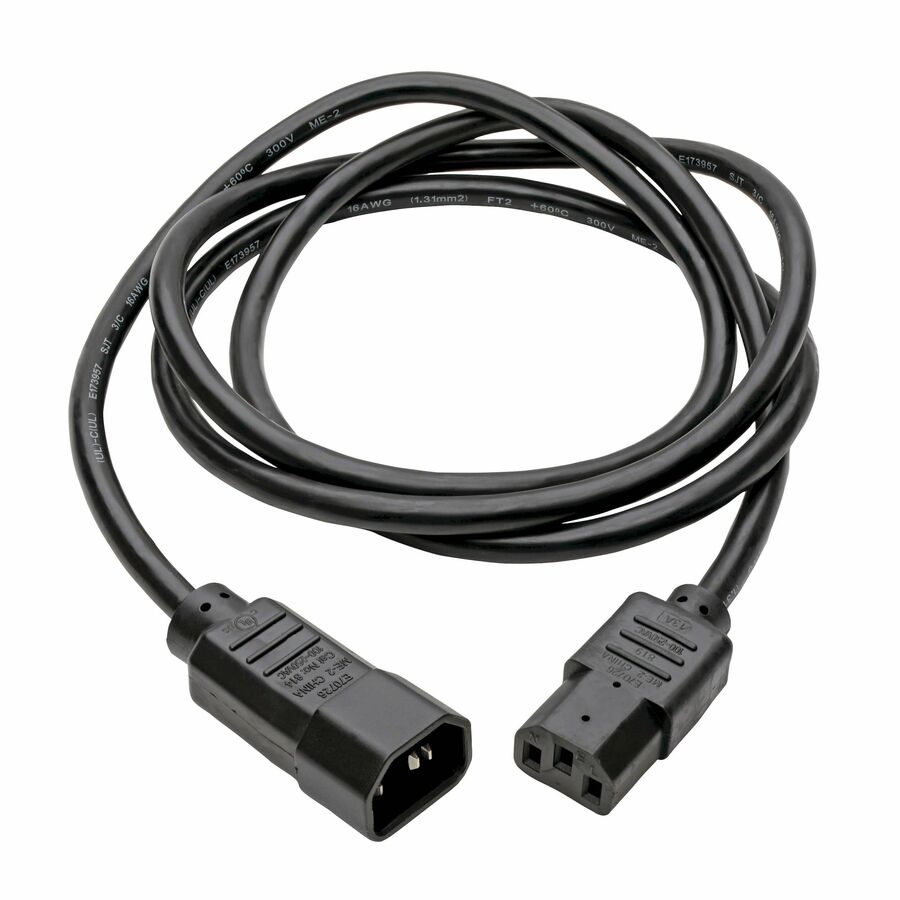
C13 to C14
Eaton
Eaton Tripp Lite Series PDU Power Cord, C13 to C14 - 6 ft
P004006
A 6 ft 18 AWG cord rated 10 A at 250 V, C13 connector to C14 inlet — the standard jumper between a rack PDU outlet and a server, switch or monitor.
$11.10Back-orderedC19 to C20
Eaton
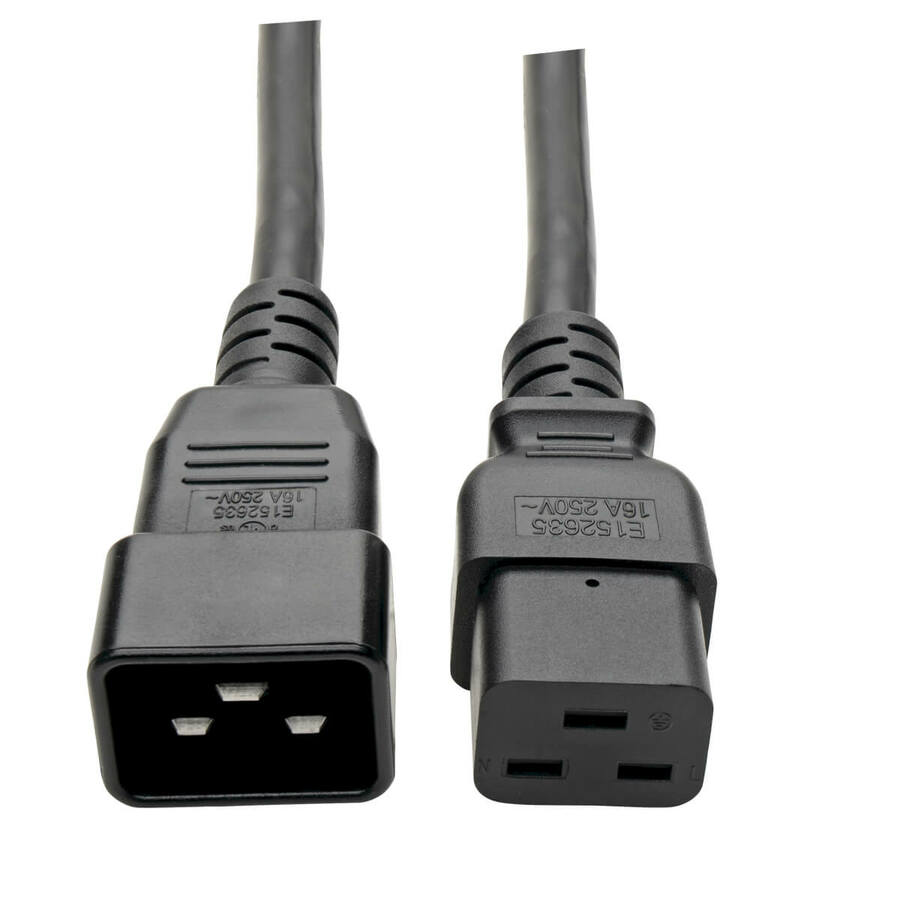
Tripp Lite by Eaton Power Extension Cord C19 to C20
P036-003-15A
A heavy-duty 3 ft 14 AWG extension rated 15 A at 250 V, C19 to C20, for the higher-current inlet on a large power supply, a blade chassis or a PDU feed.
$29.47In stockRack input
Eaton
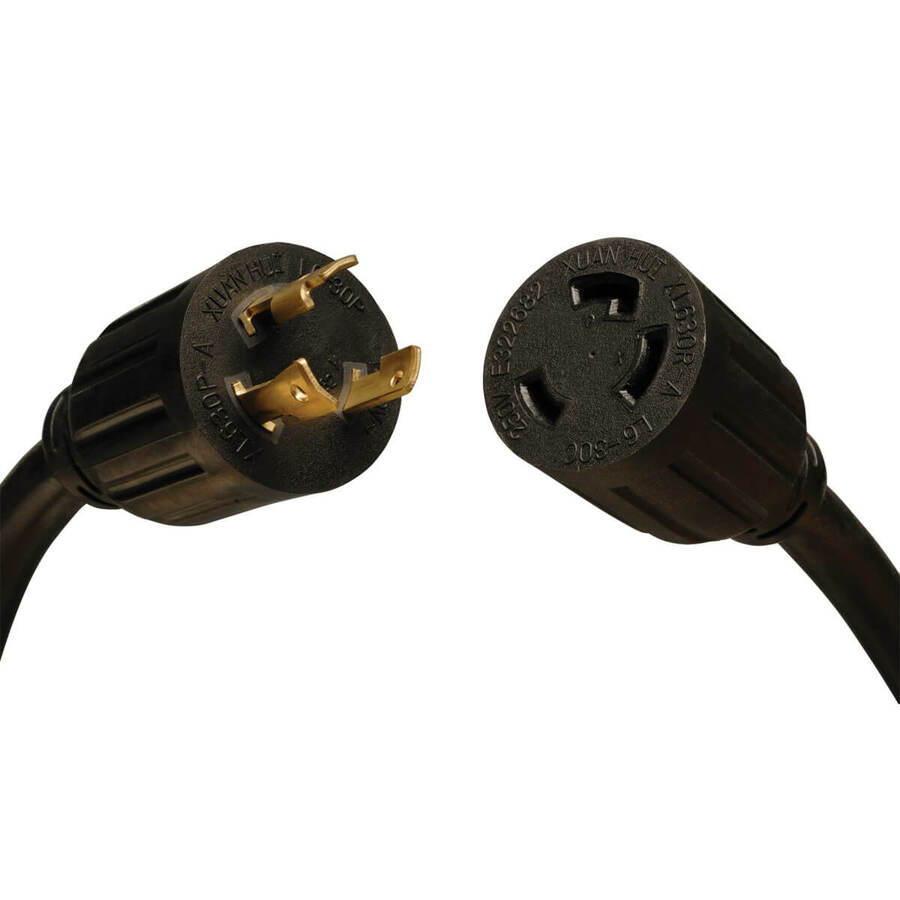
Tripp Lite by Eaton Power Extension Cord NEMA L6-30P to NEMA L6-30R
P041-008
An 8 ft 10 AWG extension rated 30 A at 250 V with a NEMA L6-30P plug and L6-30R receptacle — the twist-locking input side, upstream of the IEC couplers.
$148.76In stockFrequently asked
- What is the difference between C13 and C14?
- They are the two halves of one coupling. C14 is the inlet built into the equipment — the male, pinned part — and C13 is the connector on the end of a cord that pushes onto it. Odd sheet numbers in IEC 60320 are always the cord end and even numbers are always the equipment inlet, so the same relationship holds for C19 and C20, and for C5 and C6.
- Why is a rack cord called both C13 to C14 and C14 to C13?
- Because it genuinely has one of each. A rack PDU presents outlets shaped like C13 connectors, so the cord needs a C14 plug at the PDU end, and a server presents a C14 inlet, so the cord needs a C13 connector at the server end. Both names describe the same asymmetric cord read from opposite ends, and both are in common use in product listings.
- Can I use a C13 cord on a device with a C20 inlet?
- No, and it is not a matter of finding the right adapter. C19 and C20 are physically larger and rated for higher current precisely because the equipment behind them draws more, so a device with a C20 inlet needs a C19 connector fed from a C20-capable outlet. Count both outlet types on the PDU against the equipment list before the PDU is chosen.
- What are C15 and C16, and can I use a normal cord instead?
- They are the higher-temperature version of the C13/C14 pair, rated to 120 °C rather than 70 °C, and they are keyed so that a C15 connector will fit a C14 inlet but a standard C13 connector will not fit a C16 inlet. Equipment that carries a C16 inlet is specified that way because it runs hot, so the correct cord is the C15 one. The keying exists to stop the substitution rather than to make it awkward.
- How many amps can a C13 outlet carry?
- C13 and C14 are rated by IEC at 10 A and are commonly listed at 15 A on North American approvals; C19 and C20 are rated at 16 A and commonly listed at 20 A. The connector rating is only one of three limits that matter, though — the PDU's own load rating and the circuit feeding it are the other two, and the sum of connected equipment has to sit inside all three with headroom.
- Can Uniqcli quote cords with the PDUs and the rest of a rack build?
- Yes, and it is the sensible way to buy them. Power cords are ordered in quantity, they are inexpensive relative to the rest of a rack, and they are the item most likely to hold up a build if they arrive separately. Send the equipment list with the inlet types and counts and the cords, PDUs, UPS units and rack hardware can be quoted on one document, with country-of-origin screening on each line.
- Are C19 and C20 the same?
- No — they are the two halves of one coupling, and neither works without the other. The C19 is the connector on the end of the cord and the C20 is the inlet built into the equipment or the PDU, so a C19-to-C20 cable has one of each. They are the higher-current pair in the same IEC 60320 family as C13 and C14, which is why a large power supply, a blade chassis or a PDU feed uses them where a single server uses C13/C14.
- Is C19 male or female?
- The C19 is the female half: it is the connector on the cord, with sockets, and it plugs onto the male C20 inlet with pins on the equipment. The rule holds across the whole IEC 60320 family — the odd numbers (C13, C15, C19) are cord connectors and the even numbers (C14, C16, C20) are equipment inlets. That is also why a cord is described from its own two ends, so "C19 to C20" and "C20 to C19" name the same cable.
- What is a NEMA L6-30?
- It is a locking two-pole, three-wire grounding device rated for a maximum of 250 V and 30 A, with three connections: ground, and two hot legs. The P suffix is the plug and the R suffix is the receptacle, and the connection is made by inserting and turning clockwise to lock. It is a rack or UPS input rather than an equipment coupler, which is why an L6-30 cord usually ends in an IEC connector on the downstream side — the L6-30 feeds the PDU and the PDU's C13 and C19 outlets feed the gear.
Sources
- 1.IEC 60320-1:2021 — Appliance couplers for household and similar general purposes, Part 1webstore.iec.ch
- 2.Schneider Electric — Description of NEMA L6-30 Receptaclese.com
- 3.Interpower — IEC 60320 components terminology (the inlet number is one higher than its connector)interpower.com
- 4.Interpower — IEC 60320 C13 and C19 connectors (10 A / 16 A international, 15 A / 20 A North America)interpower.com
- 5.Interpower — Designing with IEC 60320 connectors and inlets (C15/C16 hot-cold keying at 120 °C)interpower.com
Keep reading