
Build a Local Document Assistant on DGX Spark for Engineering Manuals and SOPs
Build a local AI document assistant on NVIDIA DGX Spark to search engineering manuals and SOPs. Learn how to handle scanned PDFs, verify source citations, manage revisions and test answer accuracy before deployment.
By Uniqcli Team · · 13 min read · Updated
Key takeaways
- Start with a small, approved collection of engineering manuals or SOPs and test the assistant using real document-search questions.
- Preserve document titles, revisions, page numbers and table details so users can trace AI-generated answers back to the correct source.
- A local RAG assistant on DGX Spark needs more than an answer model. Document extraction, embeddings, retrieval and storage must also be planned and tested.
- Apply document permissions before retrieved content reaches the AI model, and verify that restricted information stays inaccessible.
- Measure retrieval accuracy, citation quality, response time and document-update behavior before expanding to more documents or users.
On this page
Finding the right information in an engineering manual isn't always straightforward. A maintenance team might need a specific torque value, an engineer might be checking a part number, or an operations team might be looking for the latest approved procedure. When that information is spread across hundreds of PDF pages, scanned documents and multiple revisions, even a simple question can take time to answer.
A local AI document assistant can make that search easier. Using retrieval-augmented generation (RAG), it searches a collection of engineering manuals and standard operating procedures (SOPs), retrieves relevant information and uses an AI model to generate an answer. The goal isn't just to provide a quick response. It's to show where the information came from, including the source document, page number and revision, so someone can verify it.
NVIDIA DGX Spark provides a compact platform for exploring this type of local AI workflow. However, building a reliable document assistant involves more than connecting a language model to a folder of PDFs. Scanned pages, complex tables, outdated revisions, document permissions and unsupported answers all need careful handling.
This guide walks through a proposed pilot using a 128 GB DGX Spark and a small, approved document collection. We'll cover document preparation, local RAG components, access controls and practical tests for answer accuracy and performance. Uniqcli has not independently implemented or benchmarked this workflow, so the steps below are recommendations to evaluate rather than verified performance results.
Choose the Documents and Questions First
A useful document assistant starts with the right documents, not the largest possible collection. For the first DGX Spark pilot, choose one clearly defined group of files, such as maintenance manuals for a specific equipment series or approved standard operating procedures (SOPs) for a single workflow. Starting small makes it easier to identify problems and measure whether the assistant is actually helping.
Use public, synthetic or otherwise authorized documents, and assign someone who understands the material to review the results. This person should be able to identify the current approved revision, confirm which instructions are authoritative and determine whether an answer accurately reflects the source.
Next, create a list of questions people would realistically ask. Include searches for exact part numbers, specifications found in tables, troubleshooting instructions and differences between document revisions. Add questions that the documents cannot answer. A reliable assistant should recognize when the available information is insufficient rather than produce a confident but unsupported response.
Keep the assistant's role clear throughout the pilot. It should help users locate information and understand what an approved document says, not replace the original procedure or a qualified engineer's judgment. For safety-critical maintenance and operating decisions, users must still follow the approved instructions and applicable review requirements.
Save these initial questions as your evaluation set. You'll use them later to determine whether errors come from document extraction, retrieval or the AI-generated answer itself.
Preserve Document Details During Extraction
A local document assistant is only as reliable as the information it can retrieve. Before building a search index, make sure the system can extract text, tables and document details without losing important context. This is especially important for engineering manuals, where a missing unit, incorrect page reference or outdated procedure can change the meaning of an answer.
Keep the original PDF or source file and give each document a unique, stable ID. Where available, record its title, revision number, effective date, section, page number and access classification. Store a file hash to help identify when the content changes, even if the filename stays the same. If any details are missing, flag them rather than guessing.
Page references need special attention. A manual might display page 42 on the printed page while a PDF viewer identifies it as page 47. Preserve both numbers when they differ, and label them clearly. This allows the assistant to provide citations that users can open and verify against the original document.
Tables and scanned pages also require careful review. Text extraction or optical character recognition (OCR) can separate values from their column headings, units or footnotes. For example, a temperature or pressure value without its unit may be misleading. Compare extracted content with the original pages, especially when manuals contain complex tables, diagrams or merged cells.
Once the content is extracted, divide it into smaller searchable passages, often called chunks. Keep related headings, instructions and table information together so each passage retains enough context to be understood. There is no universal chunk size that works for every engineering manual, so test different approaches using your actual evaluation questions.
Finally, establish a clear revision policy. Routine searches can prioritize current approved documents, while authorized users may need access to older revisions for historical comparisons. Every citation should identify the revision used, making it easier to distinguish current instructions from superseded information.
Check Where Each Processing Stage Runs
Running a document assistant locally involves more than installing an AI model. A retrieval-augmented generation (RAG) system has several components, and each one needs to be configured and tested before the assistant can reliably answer questions from engineering manuals and SOPs.
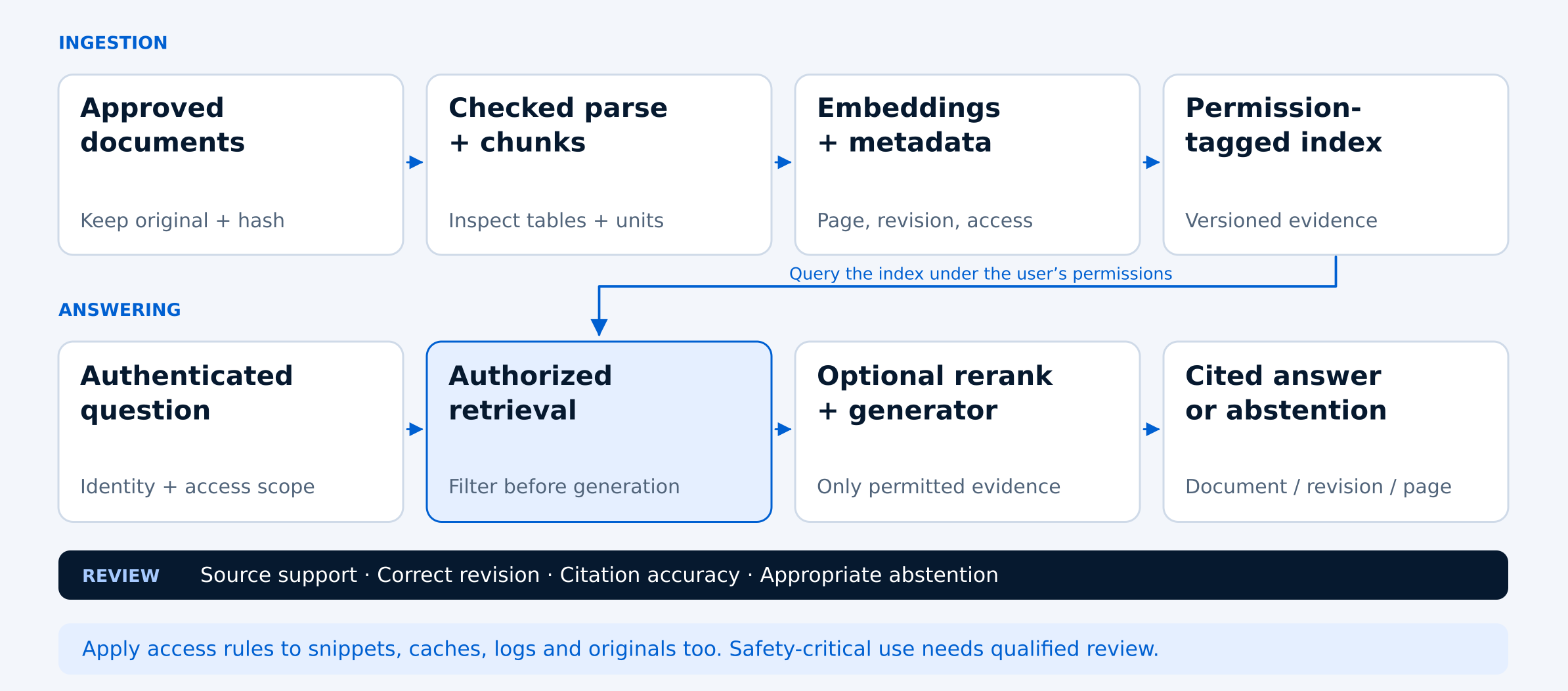
The process begins with document extraction. An embedding model then converts searchable passages into numerical representations, which are stored in a search index. When someone asks a question, the system retrieves relevant passages, may rerank them to improve relevance, and sends the selected evidence to a language model to generate an answer.
For a DGX Spark pilot, document where each component runs: PDF extraction, OCR, embeddings, search storage, retrieval, reranking and answer generation. A locally hosted interface does not necessarily mean the entire workflow runs locally. Some tools use cloud APIs for inference or document processing unless their default settings are changed.
NVIDIA provides several useful architectural references. Its DGX Spark SGLang documentation includes Llama 3.1 8B Instruct model variants as examples for local inference. NVIDIA's multi-agent chatbot example also demonstrates document retrieval with an embedding model, although its broader architecture includes more components than a small document-search pilot needs.
Another useful reference is NVIDIA's hybrid RAG example, which supports different inference configurations. However, its quickstart uses hosted NVIDIA endpoints and requires an API key. Review the configuration carefully before uploading internal documents or describing the workflow as fully local.
Start with a documented model and compatible software configuration, then evaluate retrieval quality and answer accuracy using your own documents. Include the language model, embedding model, search index and document-processing services when planning memory usage. A 128 GB DGX Spark is the proposed pilot platform here, not a guarantee that every RAG architecture or enterprise deployment will fit.
NVIDIA's enterprise RAG Blueprint has its own deployment requirements, so don't assume its complete reference stack can run unchanged on a single DGX Spark. The goal is to select a manageable set of components, confirm where data is processed and establish a repeatable configuration before expanding the system.
Enforce Access Before Evidence Reaches the Model
A local AI document assistant may keep information within your organization's infrastructure, but that alone does not make it secure. Engineering manuals and SOPs can contain confidential specifications, internal procedures or restricted technical information. Users should only be able to retrieve documents they are authorized to access.
Start by connecting the assistant to an appropriate authentication system and defining document-level permissions. These permissions must be enforced during retrieval, before any document passages are sent to the language model. Simply instructing the AI not to reveal restricted information is not enough if that information has already entered its context.
Access controls should cover more than the original files. Search results, document previews, source citations, generated answers, logs and downloadable documents can all expose sensitive information. If the system stores previous answers or caches search results, those records must also respect the user's permissions.
Test these controls using two accounts with different access levels. Ask both users the same questions and compare the retrieved passages, citations and final responses. The restricted account should not receive information from documents it cannot access.
Next, remove one account's permission to view a document and repeat the test. Confirm that previously generated answers, saved results and cached passages do not continue exposing restricted content. These checks help reveal security gaps that may not appear during ordinary question-and-answer testing.
Finally, document how access permissions are updated, how sensitive information is logged and who can review or export the original files. For engineering teams working with controlled or confidential material, these decisions should be part of the pilot design rather than added after deployment.
Evaluate Retrieval and Answers Separately
A document assistant can produce a convincing answer even when it retrieves the wrong information. That's why retrieval quality and answer accuracy should be evaluated separately. For engineering manuals and SOPs, a useful answer must be supported by the correct document, page and revision.
Start with a proposed 50-question evaluation set. Include 30 questions that can be answered from the documents, 10 where the answer depends on the document revision, and 10 that the available documents cannot answer. Have the document owner identify the expected evidence and acceptable response before testing. Adjust the mix if your document collection requires a different balance.
Evaluate retrieval first. For each question, check whether the search system returns the passages needed to answer it. Decide how many retrieved passages to inspect and keep that number consistent when comparing different configurations. If the correct evidence is missing, investigate document extraction, chunking, search and ranking before changing the language model.
Next, review the generated answer. Does it accurately reflect the retrieved evidence? Does the citation open the correct page? Is the revision current or appropriate for the question? When the documents do not contain enough information, the assistant should acknowledge that limitation rather than invent an answer.
Record each test in a worksheet with the question ID, category, authorized user, expected document and revision, retrieved passages, generated answer, citation result and response time. This makes it easier to compare configurations and identify recurring problems.
When a test fails, save the question, retrieved evidence and generated response. Distinguish between missing evidence, an outdated revision, an unsupported claim and a correct answer with an incorrect citation. Each failure points to a different part of the system that may need improvement.
The goal isn't to achieve a perfect-looking demo. It's to understand where the assistant is reliable, where it needs work and whether its answers can be independently verified before the system is used more widely.
Use these ten checks to review your local document assistant against the pilot's evaluation questions. Record the results and investigate any failures before expanding access.
- Confirm that each test question has an expected answer or a documented reason it cannot be answered.
- Check whether retrieval finds the correct document and relevant passages.
- Verify that citations open the correct source page.
- Confirm that every answer uses the appropriate document revision.
- Check that numerical values retain their correct units, labels and table context.
- Verify that answers are supported by the cited evidence rather than unsupported assumptions.
- Confirm that the assistant acknowledges questions the documents cannot answer.
- Test whether users with restricted access are prevented from retrieving unauthorized information.
- Record response times and any errors for each evaluation question.
- Save failed questions, retrieved passages and answers so problems can be reproduced and corrected.
Test Document Updates, Deletion and Simultaneous Use
A local document assistant needs to remain reliable as manuals are updated, documents are removed and more people begin using it. A successful test with a small collection of PDFs is a good starting point, but it doesn't tell you how the system will behave during everyday operations.
Start by replacing an existing manual with a newer revision. Confirm that the updated document is processed correctly and that routine searches return information from the current approved version. Then repeat your evaluation questions to check whether the assistant uses the right revision and provides accurate page citations.
Next, remove a document from the active collection. Verify that its content no longer appears in search results, generated answers or accessible caches. Check whether any saved passages or search indexes still contain the removed information. Original files, backups and logs should be handled according to your organization's retention and deletion policies.
Performance testing should cover both document processing and question answering. Measure how long it takes to extract, index and update documents separately from the time needed to generate an answer. Run queries while new files are being processed to see whether indexing jobs affect response times.
Increase the number of simultaneous users gradually, starting with one session and then testing two and four sessions. Record response times, errors, GPU memory usage and remaining system capacity. Include the 95th-percentile response time (p95), which shows the response time at or below which 95% of measured requests fall. This helps reveal slower experiences that an average alone may hide.
Finally, verify which services actually require an internet connection. After downloading the necessary models and dependencies, monitor outbound traffic during document processing and question answering. Repeat the tests with unnecessary external connections blocked. A locally hosted interface does not automatically mean the entire system operates offline.
Use these results to decide whether the pilot is ready for a larger document collection or additional users. If performance, retrieval quality or access controls deteriorate under load, address those issues before expanding the deployment.
Choose a DGX Spark Configuration for Document Search
Choosing hardware for a local AI document assistant starts with understanding the workload. The number of engineering manuals matters, but so do their formats, update frequency, document complexity and the number of people who need answers at the same time.
For this proposed pilot, a 128 GB NVIDIA DGX Spark provides a starting configuration to evaluate. That does not mean every RAG system requires 128 GB, or that every combination of models and services will fit. Memory requirements depend on the language model, embedding model, context length, inference software and other components running alongside them.
Begin by estimating the size and complexity of the document collection. A small library of searchable PDFs may require less processing than a collection containing scanned manuals, engineering drawings and tables. Optical character recognition (OCR), document extraction and indexing can also create workloads that differ from ordinary question answering.
Next, identify the expected usage pattern. An assistant serving one engineer occasionally may have different requirements from a system supporting multiple maintenance teams throughout the day. Record expected simultaneous users, acceptable response times, document update frequency and any requirements for offline operation.
Keep model memory and document storage separate in your planning. The search index, original files, extracted content and logs need appropriate storage capacity, while model weights, runtime buffers and active requests affect memory usage. Measure both during the pilot instead of assuming that a model's published size represents the complete system requirement.
Before selecting a production configuration, review the pilot results. Look at retrieval accuracy, citation quality, access controls, document-processing time, response latency and memory utilization. These measurements help determine whether the initial setup is sufficient or whether the workload needs a different architecture.
When discussing AI infrastructure requirements with Uniqcli, share the document types, collection size, expected users and evaluation results. That information provides a more useful starting point for hardware selection than choosing a system based on model size alone.
Frequently asked questions
Can NVIDIA DGX Spark run a local RAG document assistant?
Yes. NVIDIA DGX Spark can be used to evaluate a local retrieval-augmented generation (RAG) assistant for engineering manuals, SOPs and other technical documents. The workflow typically includes document extraction, embeddings, search and an AI model that generates answers from retrieved passages. Actual performance and model compatibility depend on the selected software, document collection and number of simultaneous users.
Can a local AI assistant search scanned engineering manuals and PDFs?
Yes, provided the documents are processed correctly. Scanned PDFs may require optical character recognition (OCR) before their contents can be searched. Engineering tables, diagrams, units and footnotes also need careful extraction and validation. Test the extracted content against the original pages before relying on the assistant's answers.
How can a RAG assistant provide accurate page citations?
Each searchable passage should retain its source document ID, page reference and revision information. When the assistant generates an answer, it should cite the passages used as evidence. Reviewers should open those citations to confirm that the correct page supports the answer, especially when printed page numbers differ from PDF viewer page numbers.
Is a DGX Spark document assistant completely offline and secure?
Not automatically. A document assistant can use locally hosted models and storage, but some software configurations rely on external APIs for inference, embeddings or document processing. Verify where each component runs, monitor network connections and test with unnecessary external access blocked. Security also requires authentication, document-level permissions and controls for cached answers, logs and citations.
How much memory does a local RAG assistant need on DGX Spark?
Memory requirements depend on the language model, embedding model, context length, inference software and simultaneous requests. A 128 GB DGX Spark is the proposed pilot configuration in this guide, not a universal minimum requirement. Measure actual memory use, response times and document-processing workloads before choosing hardware for a larger deployment.
Find the Right DGX Spark for Local Document AI
Planning a local RAG assistant for engineering manuals or SOPs? Share your document volume, AI model requirements, expected users and security needs with Uniqcli. Our team can help you evaluate the compute, storage and infrastructure needed for your workload.
Sources
- 1.NVIDIA — DGX Spark SGLang Model Serving Guidebuild.nvidia.com
- 2.NVIDIA — DGX Spark Multi-Agent Chatbot and Document Retrievalbuild.nvidia.com
- 3.NVIDIA — AI Workbench Hybrid RAG Examplegithub.com
- 4.NVIDIA — Enterprise RAG Blueprint and Requirementsbuild.nvidia.com