Loading the product…
Loading the product…
Attention: Due to high order volume, orders may require an additional business day to process.
Thunderbolt 4 (40Gb/s) - 1x Thunderbolt 4 Host Port With Up To 90W PD For Notebook Charging - 2x Thunderbolt 4 - 1x USB-C (10Gb/s) - 2x USB-A (10Gb/s) - 1x USB 2.0 - 1x HDMI - 1x 2.5GbE - 1x SD Reader - 1x 3.5mm Audio In/Out - 2 Year Limited Warranty
Request pricing
Confirmed with stock before any payment. TAA verified on request.
Genuine Other World Computing through authorized distribution — NDAA §889 screened before checkout. TAA verified on request.
Country of origin is manufacturer-reported and can vary by production lot. Where TAA applies to your purchase, we verify the shipping unit's origin on request.
Everything. Everywhere. Easier.
While life is often full of compromises, your dock shouldn't be. You should be able to move your workflow from the desktop to the road easily on short notice without having to choose what device or accessory to leave behind.
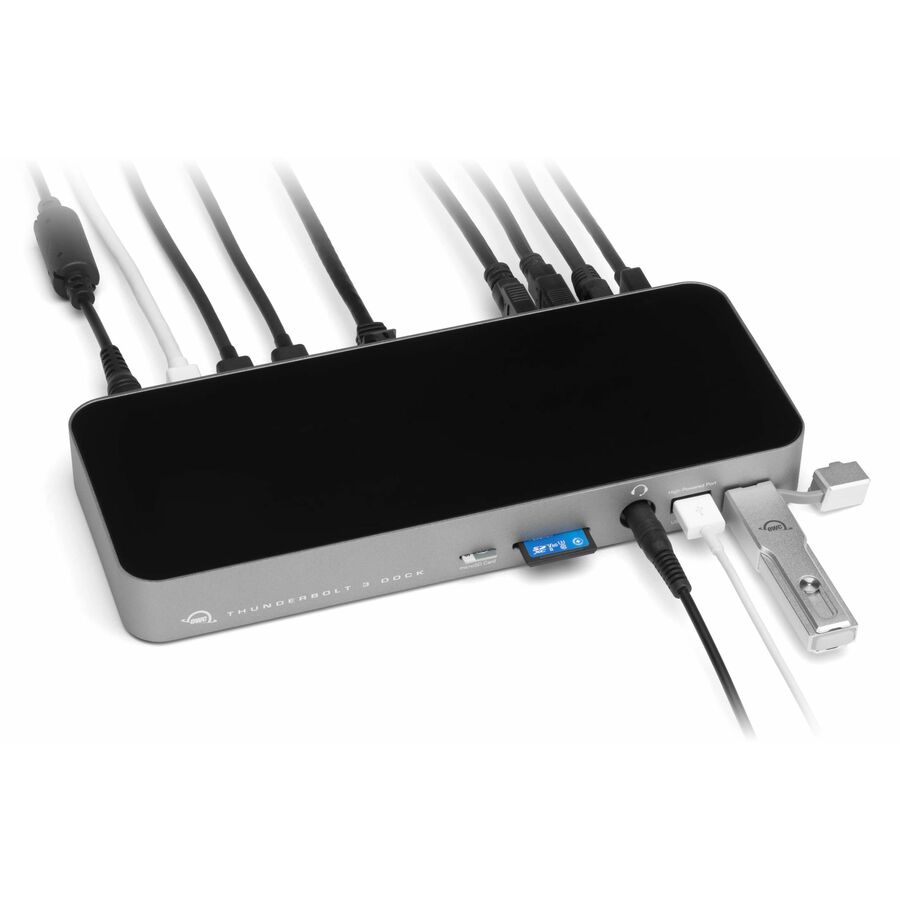
Connect everything you want everywhere you call a workspace easily with the OWC Thunderbolt Go Dock. Say goodbye to a heavy, bulky power adapter slowing you down. Or a bus-powered mini dock not having the complete ports you need. Simply plug the power cable of this world's first full-featured Thunderbolt dock with a built-in power supply into a standard outlet in coffee shops, airports, vehicles, video production carts, and more to put 11 ports of connectivity empowerment at your fingertips.
Go Easier
Built-in power supply eliminates heavy power brick hassle while enabling more workflows vs bus-powered docks.
Go Connect
Add all the external storage, multiple displays, and accessories you need with (3) Thunderbolt 4 ports, (3) USB-A ports, and (1) USB-C port.
Go Everything
One dock that works with all your Thunderbolt and USB-C devices.
Go Faster
Enhance network-based workflows and transfer files up to 2.5x faster than standard 1GbE.
Go Energized
Keep your notebook travel ready with up to 90W charging power.
Go Everywhere
Enjoy mobile connectivity with a rugged, solid aluminum heat-dissipating fanless design.
Go Managed
Rest assured you can keep your devices managed with Go Dock's MDM compatibility.
Go Connect It All
Get ahead at work and play by connecting an incredible array of past, present, and future Thunderbolt and USB devices and accessories to the Thunderbolt Go Dock. Tap into high-performance storage capacity including NVMe solutions. Record and livestream with an A/V mixer. Expand your capabilities with a PCIe expansion enclosure. Enjoy the feel of your favorite keyboard and mouse. Nearly any connectivity need you have or want is possible with a diversity of Thunderbolt and USB ports.
• Charge your laptop
• Connect one 8K / up to two 4K monitors
• Connect portable SSD storage
• Connect large desktop RAID storage
• Add an extra Thunderbolt port
• Connect / charge USB drives, accessories and devices
• Connect to IP based workflows / wired networks
• Connect a digital audio interface
• Read + Write SD Cards
• Connect two Thunderbolt daisy-chains
More from the Manufacturer
The first full-featured Thunderbolt dock without a bulky, heavy power adapter, so you can go anywhere easier and connect it all with Thunderbolt and USB-C Macs, PCs, iPads, Chromebooks, and Android devices.
Go easier: Built-in power supply eliminates heavy power brick hassle while enabling more workflows vs bus-powered docks
Go everything: One dock that works with all your Thunderbolt and USB-C devices
Go faster: Enhance network-based workflows and transfer files up to 2.5x faster than standard 1GbE
Go energized: Keep your notebook travel ready with up to 90W charging power
Go everywhere: Enjoy mobile connectivity with a rugged, solid aluminum heat dissipating fanless design
Innergize™ Enabled: custom OWC software for complete health, performance, and field upgrade management when using OWC Atlas Memory Cards with OWC Atlas Card Readers and card reader-equipped products
Dante compatible: easy Plug and Play - no software needed - into networks designed for bit perfect audio with super low latency and sample accurate synchronization
Turn Your Tablet into a Computer
With the Thunderbolt Go Dock, you can turn your tablet into a full computing platform with capabilities that exceed many desktop and notebook computer setups. Now you can transform one port on your tablet into 11 ports so you can read/write SD card media, share files in a blink on a high-speed network, free up your internal storage by offloading to an external drive, and work easier with a larger external display, mouse, and full-sized keyboard. You can even turn your tablet into a desktop video, audio, or podcasting recording and editing setup. The possibilities of how you can use the Thunderbolt Go Dock to redefine your tablet computing experience are nearly limitless.
When Mobile Is Better Than Portable
You want to connect it all and have it all work flawlessly. While bus-powered portable docks are great for most common uses, they can only provide so much power from the host computer. When you want to push your abilities to the max, the mobile ready Thunderbolt Go Dock’s built-in power supply gives you the juice you need. And it lets you take a fabulous diversity of connectivity anywhere easier by eliminating the need to carry around a pain-in-the-neck/shoulder/back power brick.
A Multi-Connectivity Solution for Millions
It’s a hassle trying to figure out or remember what interface your gear and computer has so you can use it all with a dock. Whether you have a Thunderbolt or USB-C Mac, PC, iPad, Chromebook, or Android device, the Thunderbolt Go Dock’s host port utilizes a USB-C connector to give you a multi-connectivity solution for millions of past, present, and future (yes even USB4!) computers and devices.
1,2
A Resolutionary Idea
As a digital nomad, hybrid employee, or creative production pro, you need to be able to expand your notebook’s single display – imagine…TWO 4K displays! - for maximum productivity at a temporary work location. With the Thunderbolt Go Dock’s Thunderbolt technology and HDMI 2.1 port with full HDR, you can view more detail and make edits easier on up to an 8K display. Edit large format video on one 4K display while previewing the raw playback on a second 4K display. Whatever your workstation display needs, the Thunderbolt Go Dock gives you the vision to go to a higher level.
Whether your computer or tablet is sporting the latest technology or is a few years loved, the OWC Thunderbolt Go Dock gives you multiple options to expand your visual horizons:
Full Performance for Everything Today and Yesterday, Period.
Go Energized
Keep your notebook and tablet ready for mobile use with the Thunderbolt Go Dock’s dedicated 90W power delivery Thunderbolt host port. You can also keep devices powered/charging on the other two Thunderbolt and four USB ports. Whether you’re taking a break or are done for the day, the Thunderbolt Go Dock continues to power and/or charge connected devices.
2.5x Faster + MDM
Many of today’s computers and tablets either don’t provide a network port (ugh…slow low-quality Wi-Fi) or feature the older 1Gb/s standard. Now you can transfer, copy, and/or edit files and work up to 2.5x faster over wired networks and enjoy increased productivity in an IP-based workflow with the Thunderbolt Go Dock’s 2.5Gb/s Ethernet port. Or, connect to a NAS for faster data access, backup, and 4K video streaming and editing.
With MDM compatibility, OWC Docks make Mobile Device Management a breeze. Remote manage Go Dock empowered workstations across your organization. Other docks without MDM just don’t cut it.
Ingest in a Blink
Another “one less thing to carry” benefit for you is the built-in SD card reader. Video footage and photos are a part of daily life, and the Thunderbolt Go Dock lets you ingest your creative content conveniently fast. You can also use the reader like an external drive and store or backup files at will.
Limited Warranty: 2 Year
About OWC For more than 35 years, OWC has had a simple goal. To create innovative DIY solutions to give you the most from your technology. At OWC, we feel that technology can be instrumental in changing the world for the better if it’s done right. Whether you use it to communicate, create, or safeguard, we believe that technology should be simple, affordable, and easy to use. It should just work and do what you need it to do. At OWC, it is our mission to deliver that seamless level of experience to you with every solution that we make, and in every interaction that we have. We are working to build a better world through our solutions, and it is our mission to create solutions that improve the lives of everyone that touches them. At OWC we promise to: Respect your time. Whether that is through our solutions that aim to get the tech out of the way and keep it out so you can focus on what’s important to you or through our service getting you the advice or help you need. Maximize your budget. That means in the short term in having fair prices, but most importantly in the long term by focusing on quality solutions that are built to last. Our solutions aren’t the cheapest because we know how much of a pain it is to swap out parts in your set up and we know how much you rely on your OWC gear. Support you. Every solution is backed and supported by knowledgeable representatives, not just before the sale, but during and after. You can always call, email or chat with OWC over the lifetime of the product. And that support is always free (outside of the few noted exceptions). Educate. It’s a fast moving world out there. We geek out on the tech so you don't have to. Our solutions help make complicated tasks fast and easy, our install videos demystify and our blog helps you do more with what you have and wade through the marketing-speak. Give it our all. All components in our solutions go through a strict qualification process to make sure they will perform as needed. External drive solutions are additionally tested after assembly, with some tests taking hours or even days to certify that they will go the distance. Channel you. Our solutions are tested using many different workflows so we can ensure when you plug it in, it just works. Complete the circle. There are many, many different options out there and while our hardware and software solutions are designed to work together, they are also designed to work within your setup. What We Do We empower our customers to take their technology further and ensure the investment that they made a couple years ago doesn’t have to be thrown out the door and recycled for something new. How It All Started “I started OWC because it was difficult for me to get to a local store to upgrade my own Apple. On top of that, it was very very expensive to do so and it drove me to number one do my own updgrades, but share that information and offer these upgrades so that others can benefit the same.” Environmental Sustainability We have worked tirelessly to build sustainable practices into all levels of our business operations. Join Our Team At OWC we strive to empower our customers through groundbreaking advancements in upgrades and solutions for Mac, PC, and mobile devices. With an emphasis on superior service, quality, value, and environmental responsibility, we are committed to the creation of technology that inspires the imagination and a world where everything is possible.
OWC Docking Station
| General Information | |
|---|---|
| Manufacturer | Other World Computing |
| Manufacturer Part Number | OWCTB4DKG11P |
| Brand Name | OWC |
| Product Name | Docking Station |
| Packaged Quantity | 1 |
| Product Type | Docking Station |
| Interfaces/Ports | |
| Host Interface | Thunderbolt 4 |
| Audio Line Out | Yes |
| Total Number of USB Ports | 4 |
| Number of USB 2.0 Ports | 1 |
| Number of USB 3.2 Gen 2 Type-A Ports | 2 |
| Number of USB Type-C Ports | 1 |
| USB Type-A | Yes |
| USB Type-C | Yes |
| USB Type-C Detail | 1 x USB 3.2 Gen 2 Type-C Port up to 10Gb/s (1250MB/s) - USB 2.0/3.0 backwards compatible |
| Number of USB Type-A Ports | 3 |
| Number of RJ-45 Ports | 1 |
| Network (RJ-45) | Yes |
| Number of HDMI Ports | 1 |
| HDMI | Yes |
| Thunderbolt | Yes |
| Thunderbolt Ports Quantity | 3 |
| Number of Thunderbolt 4 Ports | 2 |
| USB Power Delivery | 90W |
| Network & Communication | |
| Ethernet Technology | 2.5 Gigabit Ethernet |
| Physical Characteristics | |
| Product Color | Space Gray |
| Height | 1.42" |
| Width | 3.62" |
| Weight (Approximate) | 2.09 lb |
| Power Description | |
| Maximum Power Supply Wattage | 120 W |
| Software | |
| Operating System Supported | Windows 11, Windows 10 (64-bit), iPadOS 15, iPadOS 16, iPadOS 17, Android 12.x, Android 13.x, ChromeOS 91, Mac OS X 14.x Sonoma, Mac OS X 13.x Ventura, Mac OS X 12.x Monterey, Mac OS X 11.x Big Sur |
| Technical Information | |
| Connectivity Technology | Wired |
| Charging Capability | Yes |
| Number of Displays Supported | 2 |
| Device Supported | Desktop PC, Notebook, Smartphone, Monitor, Tablet, Workstation, Speaker, Headphone, Mouse, Keyboard |
| Supported Resolutions | 7680 x 4320, 3840 x 2160, 5120 x 2880 |
| Screen Mode Supported | 8K, 5K, 4K, 6K |
| Memory Card Reader | Yes |
| Memory Card Supported | SD |
| Warranty | |
| Limited Warranty | 2 Year |
| Miscellaneous | |
| Package Contents |
|
| Kensington Security Slot | Yes |
| Compatibility | Compatible Devices: Apple MacBook Pro (14-inch, Early 2023) MacBook Pro (16-inch, Early 2023) MacBook Pro (13-inch, Mid 2022) MacBook Pro (14-inch, Late 2021) MacBook Pro (16-inch, Late 2021) MacBook Pro (Touch, 13-inch, Late 2020) MacBook Pro (Touch, 13-inch, Mid 2020) MacBook Pro (Touch, 16-inch, Mid 2019) MacBook Pro (Touch, 13-inch, Mid 2019) MacBook Pro (Touch, 15-inch, Mid 2019) MacBook Pro (Touch, 15-inch, Late 2018) MacBook Pro (Touch, 13-inch, Mid 2018) MacBook Pro (Touch, 15-inch, Mid 2018) MacBook Pro (Touch, 15-inch, Mid 2017) MacBook Pro (Touch, 13-inch, Mid 2017) MacBook Pro (Retina, 13-inch, Mid 2017) MacBook Pro (Retina, Touch Bar, 15-inch, Late 2016) MacBook Pro (Retina, Touch Bar, 13-inch, Late 2016) MacBook Pro (Retina, 13-inch, Late 2016) MacBook Pro (Retina, 15-inch, Mid 2015) Chromebooks Android Devices iPads Intel Evo Laptops https://eshop.macsales.com/item/OWC/TB4DKG11P/ |
| Environmentally Friendly | Yes |
| Environmental Compliance | Restriction of Hazardous Substances (RoHS), Registration, Evaluation, Authorization and Restriction of Chemicals (REACH) |
| TAA Compliant | Yes |
| Country of Origin | Taiwan |
Matched on Desktop PC · Wired
Send a bill of materials or part numbers — we confirm stock and a below-market total, with TAA verified on request. No payment up front.