
NVMe Form Factors and the PCIe Lane Budget Behind the Bays
U.2, U.3, M.2, E1.S and E3.S are not interchangeable shapes for the same drive — they are different service models with different thermal and lane consequences. And a chassis full of NVMe bays asks for more PCIe lanes than most people count.
By Uniqcli Team · · 9 min read

Key takeaways
- Each NVMe bay expects four PCIe lanes, so a 24-bay chassis asks for 96 before any adapter — dense all-flash designs use PCIe switches to fan lanes out.
- U.3 uses the same bay as U.2 but a tri-mode backplane, keeping the SATA/SAS/NVMe decision open for the life of the chassis.
- M.2 belongs on boot as a mirrored pair on a dedicated carrier, not on a data tier: no hot-swap, tighter thermals, and lower endurance on cheap parts.
- Total bytes written is capacity multiplied by DWPD, by 365, by warranty years — a 1.92 TB drive at 1 DWPD over five years is about 3,504 TB.
- Warranty term is part of an endurance rating, and internal write amplification means random-write workloads consume endurance faster than host counters suggest.
On this page
Buying Guides
The bays are the easy part. The lanes behind them are the specification.
Choosing NVMe over SATA or SAS is a decision covered in the SAS-versus-SATA guide linked at the foot of this page, and by now most refreshes have made it. The decision that follows is harder and gets far less attention: which physical form factor the drives take, and whether the platform has the PCIe lanes to feed the number of bays on the quote. Each NVMe device wants four lanes of its own, so a twenty-four-bay chassis is asking for ninety-six lanes before a network adapter or a storage controller receives a single one — which is why dense all-flash chassis contain switching silicon most bills of materials never mention. Form factor then decides how the drives are serviced, how they are cooled, and whether the chassis can accept anything else in five years. This guide covers the lane arithmetic, the four form factors and what each is for, the endurance math that should size the drives, and the separate decision that boot devices deserve.
PCIe lanes a single U.2, U.3, E1.S or E3.S NVMe drive expects for itself
What twenty-four of those bays ask for before a network adapter, an accelerator or a storage controller receives one — hence the switching silicon in dense all-flash chassis
Written endurance of a 1.92 TB drive rated at one drive-write per day across a five-year warranty: capacity multiplied by DWPD, by 365, by warranty years
The drive-writes-per-day classes the market is roughly organized around — read-intensive, mixed-use and write-intensive
Count the lanes before you count the bays
Server processors publish a lane budget per socket, and it is smaller than the bay count on a dense chassis suggests. Depending on generation and vendor, a socket typically offers somewhere between sixty-four and one hundred and twenty-eight PCIe lanes, and in a two-socket system a share of that is consumed by the link between the processors. Every NVMe bay wants four of the remainder, every network adapter wants eight or sixteen, and every accelerator wants sixteen. The arithmetic runs out well before the front panel does.
Vendors solve this with PCIe switches, which fan a smaller number of upstream lanes out to a larger number of drive bays. This is a legitimate and common design, and it is why a twenty-four-bay NVMe chassis exists at all — but it means the bays share upstream bandwidth rather than each owning a private path to the processor. For most mixed workloads that is invisible; for a workload that genuinely drives many drives at full rate simultaneously, the upstream width is the real specification and belongs in the chassis comparison. Ask what the drive-to-CPU topology is, not just how many bays there are.
Two related mechanisms are worth knowing by name. Bifurcation splits a single x16 slot into multiple independent narrower links, typically four x4 links for a riser carrying NVMe devices; it is a firmware capability and not every slot on every platform supports every split. Retimers are signal-conditioning chips that keep PCIe signals viable across the longer cabled paths a front-loading backplane requires, and they become effectively mandatory at PCIe 4.0 and above. Both add cost, both appear in the chassis configuration rather than the drive line item, and both are commonly discovered late.
The form factors, and what each is actually for
U.2 is the 2.5-inch drive-shaped NVMe device: a familiar bay, front-loading, hot-swappable, and connected over four PCIe lanes through a backplane. It is the safe, mature default for general server storage, and its main constraint is thickness — the 15-millimeter class of drive needs a bay that accepts it. U.3 uses the same physical bay but a tri-mode backplane that accepts SATA, SAS or NVMe in any slot, which is the version worth paying for on a five-year chassis: it keeps the interface decision open for the life of the machine rather than fixing it at purchase.
M.2 is the small circuit-board module that mounts internally, most often in the 2280 or 22110 length. It is inexpensive and takes no drive bay, and it is not a general-purpose data drive: it is not hot-swappable, it is thermally constrained in a way full-size drives are not, and consumer-oriented parts carry endurance ratings that are unsuited to sustained server write patterns. Its correct role in a server is boot, ideally as a mirrored pair on a dedicated carrier.
The EDSFF family is where new platforms are heading. E1.S is a narrow, tall module designed for 1U density, hot-swappable, with case options that trade thickness for cooling — the format that lets a 1U server carry many drives without the thermal compromises of packing 2.5-inch devices into the same space. E3.S is the wider variant intended to replace U.2 in newer generations, with provision for wider links on the larger variants. Neither is backward compatible with a 2.5-inch bay, which makes the form factor a chassis-lifetime decision: the drives you buy in year four have to fit the bays you bought in year one.
Endurance is arithmetic, not a marketing tier
Enterprise SSDs are sold in endurance classes expressed as drive-writes per day — the number of times the drive's full capacity can be overwritten every day for the warranty period. The market is roughly organized around one DWPD for read-intensive work, three for mixed use and ten for write-intensive work, and the price difference between classes at the same capacity is substantial. The class is not a quality tier; it is a specification about write volume, and buying above your workload is as wasteful as buying below it is risky.
The conversion to total bytes written is simple and worth doing on every quote. Multiply capacity in terabytes by the DWPD rating, by 365, by the warranty term in years. A 1.92-terabyte drive rated at one DWPD with a five-year warranty gives 1.92 × 1 × 365 × 5, or about 3,504 terabytes written across its warranted life. That single number is what you compare against your own measured write volume — and if you have not measured it, that is the first task, because most estimates of write volume are wrong by an order of magnitude in one direction or the other.
Two adjustments make the comparison honest. First, warranty term is part of the rating: the same DWPD figure over three years is a materially smaller entitlement than over five, so compare total bytes written rather than the headline class. Second, the host is not the only writer. Garbage collection inside the drive amplifies host writes by a factor that depends on the workload's randomness and on how much spare area the drive keeps, so a small-random-write workload consumes endurance faster than its host-side counters suggest. Keeping some capacity unallocated increases the drive's effective spare area and reduces that amplification — cheap insurance on a write-heavy tier.
The arithmetic on one drive
Axiom Memory Solutions
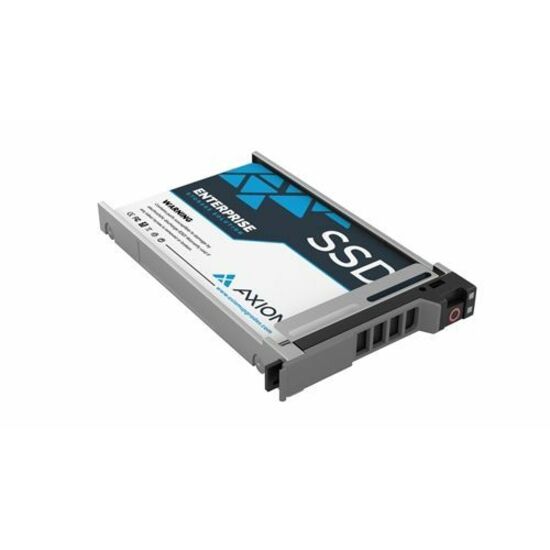
Axiom UX10 1.92 TB Solid State Drive
SSDUX10HN1T9-AX
A 2.5-inch NVMe data-center SSD on a PCIe 4.0 x4 link, hot-swappable, in the capacity and endurance class most general-purpose virtualization and file tiers land on once the write volume has actually been measured.
Confirm the bay thickness the chassis accepts and the drive's z-height before ordering — a 2.5-inch drive that does not physically fit the bay is the most avoidable return in this category.
$2,770.10In stockSpecifications
- Product Type
- Solid State Drive
- Device Supported
- Data Center, Server
- Storage Capacity
- 1.92 TB
- Hot Swappable
- Yes
- Manufacturer Part Number
- SSDUX10HN1T9-AX
- Limited Warranty
- 5 Year
- Drive Type
- Internal
- Form Factor
- 2.5"
- Manufacturer
- Axiom Memory Solutions
- Product Name
- 1.92TB Enterprise U.2 PCIe X4 SSD for HP
- Product Series
- UX10
- Brand Name
- Axiom
Manufacturer-published attributes for this drive, read at page render from the same record the product page shows. The endurance rating and the total-bytes-written figure sit further down the full specification list linked below — run that arithmetic against your own measured write volume rather than against a class name. Specifications and licensing figures in this guide are checked against manufacturer documentation and live catalog data.
Boot devices are a separate decision
Boot storage should not come out of the data bays, and it should not be a single device. The pattern that has settled across the industry is a pair of small enterprise M.2 devices on a dedicated internal carrier, mirrored, so a failed boot device is a replacement rather than a rebuild — and so every front bay stays available for data. The carriers are configured at order time and are awkward to retrofit, which makes this a purchase-order decision rather than a later improvement.
Sizing has moved. Hypervisor boot requirements grew substantially in recent releases, with larger minimum device sizes and, in several products, deprecation of small removable media as the sole boot device because of the write volume the system generates against it. Check the current installation guide for the exact release being deployed rather than reusing a size that worked two versions ago, and give the device headroom for the logging and scratch space the platform writes continuously.
The related discipline is keeping write-heavy data off the boot devices. Logs, telemetry, swap and any application scratch space belong on the data tier, not on a small internal module chosen for its price. Boot-class devices are specified for a boot workload, and the fastest way to consume one prematurely is to point a continuous log stream at it.
Seven checks on an NVMe configuration
Bays, lanes, thermals and endurance are one decision. These are the points where treating them separately produces an expensive surprise.
- Add up four lanes per NVMe bay plus the lanes for every adapter and accelerator, and compare the total against the platform's published per-socket budget.
- Ask what the drive-to-processor topology is — direct lanes or a PCIe switch — and what the upstream width is if drives share one.
- Confirm bifurcation support for the specific slot and riser position any NVMe riser will occupy, not for the platform in general.
- Choose U.3 over U.2 on a five-year chassis wherever it is offered, so the bay can still accept a different interface later.
- Check drive z-height against the bays the chassis actually accepts, and check airflow and ambient limits for high-power drives in dense configurations.
- Measure host write volume before choosing an endurance class, then compare total bytes written — capacity by DWPD by 365 by warranty years — rather than class names.
- Specify boot as a mirrored pair on a dedicated carrier, sized against the current installation guide for the release being deployed, with logs and scratch kept on the data tier.
Questions on NVMe form factors and lanes
How many PCIe lanes does a 24-bay NVMe server need?
Ninety-six, if every bay gets a private four-lane path — which is more than most single-socket lane budgets and leaves nothing for networking or accelerators. Dense all-flash chassis therefore use PCIe switches that fan fewer upstream lanes out to more bays. That is a sound design, but it means bays share upstream bandwidth, so the question to ask about a chassis is what the drive-to-processor topology is and how wide the upstream link is.
U.2 or U.3 — is the difference worth paying for?
On a chassis you expect to keep for five years, usually yes. The drives look the same and use the same bay; the difference is the backplane. A U.3 tri-mode backplane accepts SATA, SAS or NVMe in any slot, so the interface decision stays open for the life of the machine instead of being fixed on the day you order it. That optionality is difficult and often impractical to add later.
Can I use M.2 drives for server data storage?
For boot, yes — ideally a mirrored pair on a dedicated carrier. For data, no. M.2 modules are not hot-swappable, they are thermally constrained relative to full-size drives, and the inexpensive parts carry endurance ratings unsuited to sustained server write patterns. Using them as a data tier trades a small saving for a service model that requires downtime on every replacement.
How do I convert a DWPD rating into something I can compare?
Multiply capacity in terabytes by the DWPD figure, by 365, by the warranty term in years. A 1.92 TB drive rated at 1 DWPD over five years works out to roughly 3,504 TB written. Compare that against your own measured host write volume, and remember two adjustments: warranty term is part of the rating, and internal write amplification means a random-write workload consumes endurance faster than host-side counters suggest.
Keep reading
Related on storage
Have the bays, lanes and endurance sized as one configuration
Send the chassis you are considering, the workload's measured write volume and what else needs a slot. We will come back with a priced, availability-checked configuration — drives in a form factor the chassis will still accept in five years, and an endurance class chosen against your numbers.